

SoundLab - Audio Editor
孛 刘 · Music
Independent analytics for this App Store listing. AppTracker is not affiliated with 孛 刘.
Chart standing · US
What changed · US
Listing changes AppTracker has observed for this app in this storefront — new versions, price moves, rating shifts, and store copy.
- Fixed an issue that could prevent the automatic recovery of new, unsaved projects. - New unified colors, icons and page layouts, with Projects and Files managed separately and your most-used features easier to find. - A cleaner layout for the Editor’s panels and buttons. - Vocal Separator and Stem Separator now run on a new generation of AI separation models, with clear gains in both quality and speed. - Stem Separator adds a stem mixer — preview and adjust each stem, then export the balance you set; you can choose 4 Stems, 6 Stems or a model fine-tuned for a single stem, and pick which stems to export. - AI Noise Reducer now uses an upgraded model that cleans up voice recordings better. - You can now share multiple files at once from other apps, such as Voice Memos.
Ratings breakdown · US
The star breakdown behind this app's rating in this storefront.
In-app purchases · US
What this app sells inside itself, grouped by kind and priced for this storefront.
Screenshots



Keywords this app targets
Search terms AppTracker associates with this app — estimates, not search volume. ❝ = in the app's title; a highlighted number is its current position for that term.
Similar apps
Competitors and close alternatives, as estimated by AppTracker.
 Audio Editor - AI Music Editor
Beijing Beibeitan Technology Co., Ltd.
1 shared topic · 3 shared title words
Audio Editor - AI Music Editor
Beijing Beibeitan Technology Co., Ltd.
1 shared topic · 3 shared title words
 Audio Editor : Audiolab
Breeze Technology Co., Limited
1 shared topic · 3 shared title words
Audio Editor : Audiolab
Breeze Technology Co., Limited
1 shared topic · 3 shared title words
 Vocal Remover Editor: MusicLab
Happy Bees Limited
2 shared topics · 1 shared title word
Vocal Remover Editor: MusicLab
Happy Bees Limited
2 shared topics · 1 shared title word
 Audio Editor - Music editor
Beijing Shangtang Technology Co., Ltd.
1 shared topic · 3 shared title words
Audio Editor - Music editor
Beijing Shangtang Technology Co., Ltd.
1 shared topic · 3 shared title words
 Audio Mastering - SoundBoost
DIKTATORIAL INC
2 shared topics · 1 shared title word
Audio Mastering - SoundBoost
DIKTATORIAL INC
2 shared topics · 1 shared title word
 Voice Recorder & Audio Editor
TapMedia Ltd
1 shared topic · 3 shared title words
Voice Recorder & Audio Editor
TapMedia Ltd
1 shared topic · 3 shared title words
 Soundboard Studio
App Business Ventures LLC
1 shared topic
Soundboard Studio
App Business Ventures LLC
1 shared topic
 BandLab – Music Maker & Beats
BandLab Singapore Pte Ltd
1 shared topic
BandLab – Music Maker & Beats
BandLab Singapore Pte Ltd
1 shared topic
About
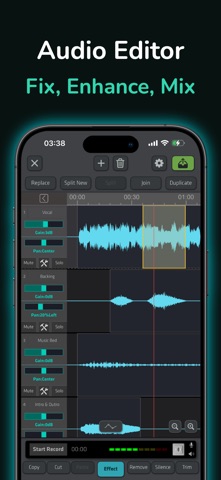
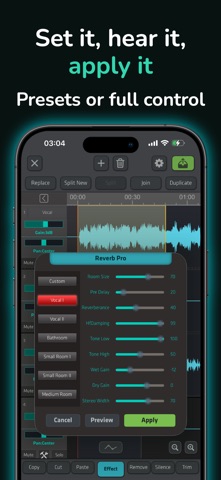
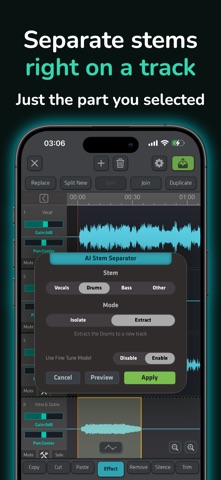
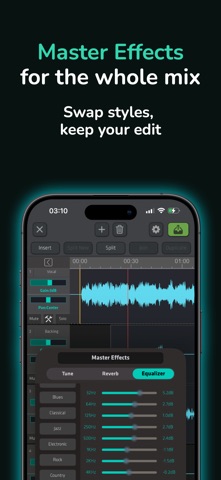
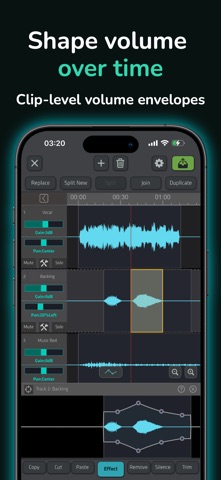
Bringing desktop-grade audio editing, recording, and on-device AI together, SoundLab is a powerful sound editor that lets you edit audio, clean up speech, separate vocals, and mix up to 16 tracks. SoundLab is more than an audio editor. It is built for the ideas, quick edits, and unexpected creative needs that come up during music and podcast production, so you can start creating anytime, anywhere on your iPhone or iPad. We won't claim SoundLab replaces a desktop DAW. But it is a serious mobile production tool for the moment the idea arrives and you don't want to open a computer — or wait thirty seconds for a desktop DAW to launch. Precise Multitrack Audio Editor • Mix up to 16 tracks with gain, pan, mute, and reordering. • Copy, cut, paste, trim, insert, replace, split, duplicate, join, move, and more—with unlimited undo/redo. • Zoom smoothly for millisecond-level selections. • Loop any range while you work. • Draw non-destructive volume curves for fades and ducking. • Record overdubs directly into your project while monitoring playback. AI Vocal Separator & Vocal Remover Separate vocals and instrumentals, create acapellas, or make backing tracks with the vocal remover. Karaoke Mode preserves fuller accompaniment. AI runs locally: no uploads or server queue. AI Stem Separator Split into four stems—vocals, drums, bass, other—or six with guitar and piano. Preview and balance parts, then export a mix or individual stems. AI Noise Reducer & Audio Enhancer Use AI Noise Reducer on recordings or AI Noise Suppression on selected audio. EQ, compression, de-essing, normalization, amplification, and Bass Boost provide enhancement for voice and music. 25+ Selection-Based Effects Apply 25+ effects to any waveform range, including AI separation and noise suppression, 10-band EQ, Reverb Pro, Tape Delay, Compressor, Change Pitch/Tempo, Fade In/Out, Phaser, Reverse, Silence Remover, and more. Master Effects Master Effects run in real time on the mix bus. Adjust tempo, pitch, reverb, and EQ while previewing, then export alternate versions without changing tracks or clips. Audio Recorder • Quick Recorder: Capture ideas with your chosen input device. • Recording Studio: Monitor your mic, set input gain, use a limiter and reverb, and record over a backing track—with or without it in the saved mix. • Use compatible external microphones and audio interfaces recognized by iOS. Import, Create & Organize • Import from Files, Music Library, other apps, or Wi-Fi; extract audio from video. • Convert text to speech and add, insert, or replace audio in your project. • Sync audio with iCloud; archive and restore projects through iCloud, USB drives, or external storage. • Use Video Composer to mix audio with video and create soundtrack videos. Flexible Export Export AAC, ALAC, MP3, FLAC, or WAV with selectable channels and sample rates, plus high-bitrate and lossless options. Add metadata and cover art in supported formats. Save to Files or iCloud, share, or export a ringtone. SoundLab is perfect for: • Music lovers and independent creators • Podcast and voice-over producers • Music students and teachers • Especially for users who are familiar with Audacity or Audition SoundLab Pro SoundLab Pro unlocks all Pro features. Choose monthly or annual auto-renewing subscriptions or a one-time permanent purchase. All support Family Sharing with up to five other family members. Payment is charged to your Apple Account at confirmation. Free trials convert to paid subscriptions, and subscriptions auto-renew unless canceled at least 24 hours before the current period ends. Manage or cancel in App Store account settings. Terms of Use: https://www.castpeer.biz/agreement.html Privacy Policy: https://www.castpeer.biz/privacy.html Customer Support Contact us in the app: Mine → Contact Us Official website: https://www.soundlabs.app YouTube: https://www.youtube.com/@soundlab-app
What's new · 2.11.6
- Fixed an issue that could prevent the automatic recovery of new, unsaved projects. - New unified colors, icons and page layouts, with Projects and Files managed separately and your most-used features easier to find. - A cleaner layout for the Editor’s panels and buttons. - Vocal Separator and Stem Separator now run on a new generation of AI separation models, with clear gains in both quality and speed. - Stem Separator adds a stem mixer — preview and adjust each stem, then export the balance you set; you can choose 4 Stems, 6 Stems or a model fine-tuned for a single stem, and pick which stems to export. - AI Noise Reducer now uses an upgraded model that cleans up voice recordings better. - You can now share multiple files at once from other apps, such as Voice Memos.
Details