

RuinRisk
RYUICHIROU SHIMONO · Finance
Independent analytics for this App Store listing. AppTracker is not affiliated with RYUICHIROU SHIMONO.
Chart standing · US
What changed · US
Listing changes AppTracker has observed for this app in this storefront — new versions, price moves, rating shifts, and store copy.
This update requires iOS 18 or later. • Inputs are remembered. Win rate, risk:reward and capital risk are kept for the next launch. "Reset Inputs to Defaults" in the menu (Legacy) or in Settings (Pro) restores the starting values. • Type values directly in Legacy mode. Tap the pencil icon to enter a number instead of using the slider. Also fixed an issue in Pro mode where a value typed with a comma as the decimal separator was discarded. • Kelly guidance revised (Pro). The app no longer suggests raising your risk toward the Kelly figure. It flags position sizes above the Kelly reference and always shows the assumptions and limits behind that figure. • Clearer HEATMAP (Pro). The three inputs are now compared on the same scale, labels have been reworded, and a note appears when your current setting is outside the chart's range. • Plan comparison (Pro). You can apply a saved plan to your inputs. When the five-plan limit is reached, the app now tells you instead of removing the oldest plan. • Accessibility. VoiceOver labels for buttons, sliders and the heatmap, layouts that adapt to larger text sizes, and support for Reduce Motion. • Faster analysis (Pro). Monte Carlo results are cached, so returning to the same settings is quicker, and a calculation stops when you leave the screen. • iPad. Fixed the Legacy heatmap appearing small and off to the left. • Purchase screen. If product information can't be loaded, you can try again, and Restore purchase is always available. • Other small fixes, including a message when a CSV file can't be created.
In-app purchases · US
What this app sells inside itself, grouped by kind and priced for this storefront.
Screenshots




Keywords this app targets
Search terms AppTracker associates with this app — estimates, not search volume. ❝ = in the app's title; a highlighted number is its current position for that term.
Similar apps
Competitors and close alternatives, as estimated by AppTracker.
 FX Calculator Pro
Abid Rahim
FX Calculator Pro
Abid Rahim
 Trapound Go
Trapound LLC
Trapound Go
Trapound LLC
 Trade Size stock trading risk
michael dardol
1 shared topic
Trade Size stock trading risk
michael dardol
1 shared topic
 Finance Calculator Pro
Anatoly Weinstein
1 shared topic
Finance Calculator Pro
Anatoly Weinstein
1 shared topic
 Pips & Lot Size Calculator
Alona Nesterenko
Pips & Lot Size Calculator
Alona Nesterenko
 PSC: Position Size Calculator
Vladyslav Boiko
PSC: Position Size Calculator
Vladyslav Boiko
 TradaZen: Trading Journal
Mehdi Azizi
TradaZen: Trading Journal
Mehdi Azizi
 Forex Calculators
Xiaobin Li
Forex Calculators
Xiaobin Li
About
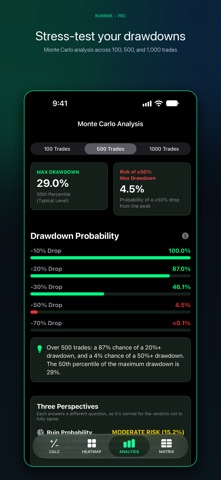
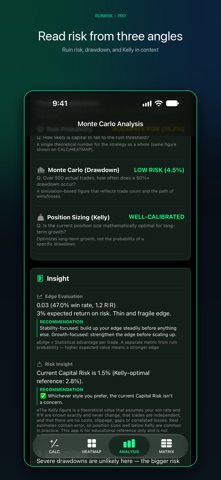
RuinRisk shows how likely a trading plan is to wipe out your capital, and how deep the drawdowns along the way can get. Enter three numbers and the result updates as you move the sliders. THREE INPUTS • Win rate • Risk:reward ratio • Capital risk (the share of your capital you risk on each trade) Set each one with a slider or type the value directly. All three move in steps of 0.1 and are remembered the next time you open the app. FREE: LEGACY MODE • CALC: Risk of ruin, defined as the probability of losing all of your capital, calculated instantly from your three inputs. • HEATMAP: A color-coded risk-of-ruin table. Choose which parameter to hold fixed, pinch to zoom, and double-tap to return to the default zoom. • A short walkthrough appears on first launch and can be reopened anytime from the button at the top right. PREMIUM: PRO MODE Pro mode is unlocked with a one-time in-app purchase. It is not a subscription. • CALC: Ruin is defined as your capital falling to a level you choose (50% by default; 30% and 20% are also available). The theoretical value is shown next to a log-growth estimate, along with the difference between the two. • HEATMAP: Marks your current settings on the map, compares which of the three inputs drives your risk the most, and shows how far the risk of ruin would fall if you changed one input on its own. • ANALYSIS: Monte Carlo simulation of maximum drawdown over 100, 500 or 1,000 trades, with the probability of a 10%, 20%, 30%, 50% or 70% drop from the peak. Results are summarized from three perspectives: ruin probability, Monte Carlo drawdown, and position sizing against the Kelly criterion. • MATRIX: A table of drawdown probabilities from 5% to 100% across 100, 500 and 1,000 trades. Save up to five plans, compare them side by side, apply a saved plan to your inputs, and export the table as a CSV file. • Settings: Ruin definition, compounding on or off, simulation quality (1,000, 10,000 or 100,000 runs), and the percentile used for maximum drawdown (50th, 75th or 95th). Legacy and Pro define ruin differently, so the same inputs give different numbers in each mode. The app explains the difference on screen. WHO IT'S FOR • Traders who want to check a position size before putting real money at risk • Anyone comparing approaches with different win rates and risk:reward ratios • People learning money management who want to see how the numbers move GOOD TO KNOW • No ads, no account and no tracking. Your inputs and saved plans stay on your device. • Supports VoiceOver and larger text sizes. • For iPhone and iPad. Requires iOS 18 or later. • Available in English and Japanese. RuinRisk is a calculation tool for education and reference. Its results are theoretical values and simulations based on the numbers you enter. They are not investment advice, and they do not predict or guarantee future results. Trading involves the risk of loss.
What's new · 4.4
This update requires iOS 18 or later. • Inputs are remembered. Win rate, risk:reward and capital risk are kept for the next launch. "Reset Inputs to Defaults" in the menu (Legacy) or in Settings (Pro) restores the starting values. • Type values directly in Legacy mode. Tap the pencil icon to enter a number instead of using the slider. Also fixed an issue in Pro mode where a value typed with a comma as the decimal separator was discarded. • Kelly guidance revised (Pro). The app no longer suggests raising your risk toward the Kelly figure. It flags position sizes above the Kelly reference and always shows the assumptions and limits behind that figure. • Clearer HEATMAP (Pro). The three inputs are now compared on the same scale, labels have been reworded, and a note appears when your current setting is outside the chart's range. • Plan comparison (Pro). You can apply a saved plan to your inputs. When the five-plan limit is reached, the app now tells you instead of removing the oldest plan. • Accessibility. VoiceOver labels for buttons, sliders and the heatmap, layouts that adapt to larger text sizes, and support for Reduce Motion. • Faster analysis (Pro). Monte Carlo results are cached, so returning to the same settings is quicker, and a calculation stops when you leave the screen. • iPad. Fixed the Legacy heatmap appearing small and off to the left. • Purchase screen. If product information can't be loaded, you can try again, and Restore purchase is always available. • Other small fixes, including a message when a CSV file can't be created.
Details