

CountNote
Miraku Inc. · Business
Independent analytics for this App Store listing. AppTracker is not affiliated with Miraku Inc.
Chart standing · US
What changed · US
Listing changes AppTracker has observed for this app in this storefront — new versions, price moves, rating shifts, and store copy.
Due to changes in our development environment, CountNote now requires iOS 15 or later. You can now save notes with only a title. Added “Add Multiple Notes” under Settings > Useful Tools. Enter one title per line to create multiple notes at once. Export and import now support creation and modification dates, preserving them when transferring notes. Other improvements: ・Fixed missing images in the text-to-speech screen and improved its menu. ・Refined screen designs for better readability. These changes also prepare CountNote for major upcoming features. Stay tuned for future updates!
Ratings breakdown · US
The star breakdown behind this app's rating in this storefront.
In-app purchases · US
What this app sells inside itself, grouped by kind and priced for this storefront.
Screenshots


Keywords this app targets
Search terms AppTracker associates with this app — estimates, not search volume. ❝ = in the app's title; a highlighted number is its current position for that term.
Similar apps
Competitors and close alternatives, as estimated by AppTracker.
 Notebooks: Write and Organize
Alfons Schmid
1 shared topic
Notebooks: Write and Organize
Alfons Schmid
1 shared topic
 Simple Notes - Notepad Manager
Komorebi Inc.
Simple Notes - Notepad Manager
Komorebi Inc.
 UpNote - notes, diary, journal
UpNote Pte. Ltd.
UpNote - notes, diary, journal
UpNote Pte. Ltd.
 Notepad - Simple Notes & Memo
Komorebi Inc.
Notepad - Simple Notes & Memo
Komorebi Inc.
 Words Counter Plus
Heng Jia Liang
Words Counter Plus
Heng Jia Liang
 StickyNote: Home Screen Notes
Shota Yamashita
StickyNote: Home Screen Notes
Shota Yamashita
 LockScreenNotes
Takumi Banjoya
LockScreenNotes
Takumi Banjoya
 Notewrap - Writers Note Book
Betyl Pty Ltd
1 shared topic
Notewrap - Writers Note Book
Betyl Pty Ltd
1 shared topic
About
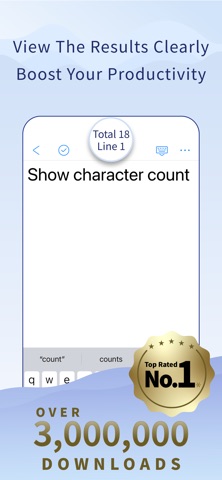
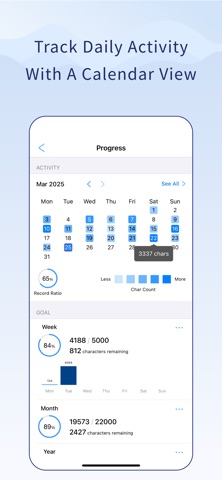
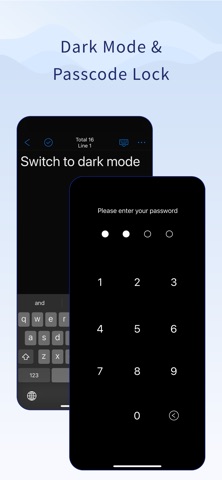
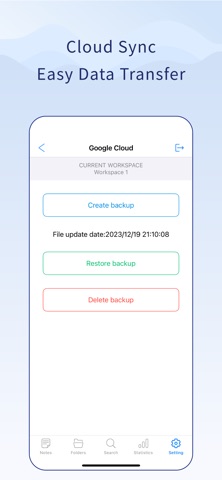
・*。*:。・*。・*:。・*。*・*。*。* Over 10 Years of Trust 3 Million Downloads & Counting! ・*。*:。・*。・*:。・*。*・*。*。* Top-rated in the note app category Build a writing habit that lasts Your word count becomes your motivation. Graphs, calendars, goals, and rankings— Everything supports your daily writing. CountNote: The writing app that fuels your routine. ■ Turn Your Words Into Motivation ・Count characters, words, and lines in real-time ・Visualize your progress with graphs and calendars ・Set weekly, monthly, or yearly writing goals ・Boost your writing habits with motivation and insights ■ Organize Your Notes Effortlessly ・Organize notes with folders and colors for better clarity ・Use tags to categorize your notes and manage them across multiple tags ・Pin important notes, lock editing, and add passwords ・Quick actions: copy, duplicate, PDF export, and text-to-speech ■ Safe and Reliable ・Auto-save and version history to protect your work ・Deleted notes are stored for 30 days ・Cloud backup and multi-device sync supported ■ Fully Customizable ・Choose your theme, font, and layout ・Set custom counting rules and save templates ・iOS 14+ widget support for quick access ■ Go Premium for More Power ・Ad-free experience ・Create unlimited folders and tags ・Create folders inside folders with unlimited folder hierarchy • Customize notes and folders with any color you like using Custom Colors ・Create multiple workspaces for different projects ・Lock and organize your important notes ・Google Cloud backup and auto-save ・Seamless export and import for data transfer ・View historical writing stats ・Stay motivated with progress tracking ・Writing Assist makes undo, cursor movement, and symbol input smooth Not just another note app— CountNote helps you build a writing habit. Perfect for: Note | Memo | Report | University report | Manuscript | Paper | Assignment | Essay | Writing | Novel | Draft Terms of Use (EULA): https://www.apple.com/legal/internet-services/itunes/dev/stdeula/ *Top-rated note app in Japan’s App Store “note” category (March 2025, Miraku survey)
What's new · 82.3
Due to changes in our development environment, CountNote now requires iOS 15 or later. You can now save notes with only a title. Added “Add Multiple Notes” under Settings > Useful Tools. Enter one title per line to create multiple notes at once. Export and import now support creation and modification dates, preserving them when transferring notes. Other improvements: ・Fixed missing images in the text-to-speech screen and improved its menu. ・Refined screen designs for better readability. These changes also prepare CountNote for major upcoming features. Stay tuned for future updates!
Details