

Handwriting Keyboard
Catalystwo, LLC · Utilities
Independent analytics for this App Store listing. AppTracker is not affiliated with Catalystwo, LLC.
Chart standing · US
What changed · US
Listing changes AppTracker has observed for this app in this storefront — new versions, price moves, rating shifts, and store copy.
You can now switch from handwriting to QWERTY, symbols, and the number pad. We added a Return key to the number pad, improved key spacing and sizing on iPhone, and reduced memory use when switching keyboards.
Ratings breakdown · US
The star breakdown behind this app's rating in this storefront.
In-app purchases · US
No in-app purchases.
Screenshots
Keywords this app targets
Search terms AppTracker associates with this app — estimates, not search volume. ❝ = in the app's title; a highlighted number is its current position for that term.
Similar apps
Competitors and close alternatives, as estimated by AppTracker.
 Japanese Handwriting Keyboard
倩喜 阮
1 shared topic · 3 shared title words
Japanese Handwriting Keyboard
倩喜 阮
1 shared topic · 3 shared title words
 mazec
MetaMoJi Corporation
2 shared topics
mazec
MetaMoJi Corporation
2 shared topics
 Korean Handwriting Board
倩喜 阮
1 shared topic · 1 shared title word
Korean Handwriting Board
倩喜 阮
1 shared topic · 1 shared title word
 Korean Handwriting Keyboard
Enfour, Inc.
Korean Handwriting Keyboard
Enfour, Inc.
 Typster - Big Keys Keyboard
PAAL EIRIK PAULSEN
1 shared title word
Typster - Big Keys Keyboard
PAAL EIRIK PAULSEN
1 shared title word
 片手キーボードPRO
TAKAFUMI YAMAMOTO
1 shared topic
片手キーボードPRO
TAKAFUMI YAMAMOTO
1 shared topic
 Typewise Offline Keyboard
Typewise AG
1 shared title word
Typewise Offline Keyboard
Typewise AG
1 shared title word
 Thai Handwriting Board
倩喜 阮
Thai Handwriting Board
倩喜 阮
About
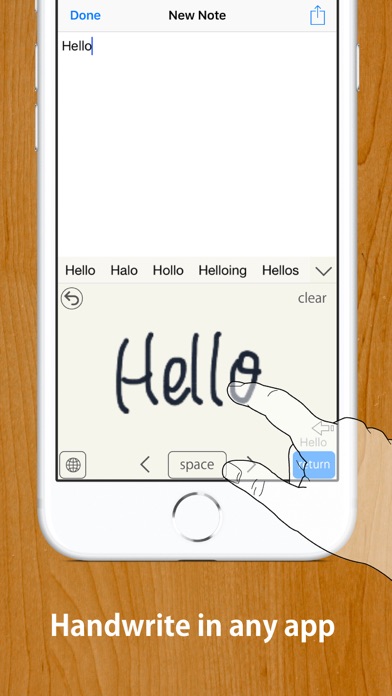
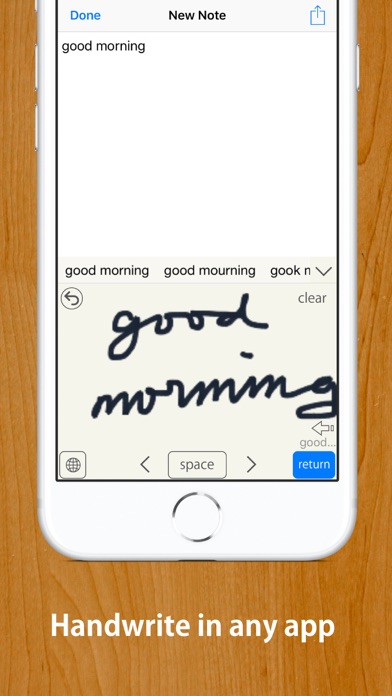
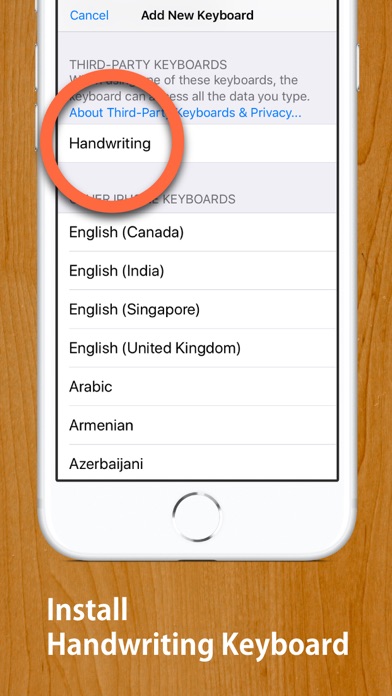
Write by hand. Type in your apps. Handwriting Keyboard lets you enter text with your finger or Apple Pencil in apps such as Messages, Mail, Safari, and Notes. Recognition runs entirely on your device, so the keyboard works offline. Full Access is not required. Your input is not transmitted, and the app does not collect data. IMPORTANT — SUPPORTED LANGUAGES Handwriting recognition supports U.S. English and Japanese only. Other languages, including British English, are not supported. HOW TO GET STARTED 1. Open the Handwriting Keyboard app and tap “Open Settings.” 2. Tap “Keyboards,” then enable English (US), Japanese, or both. Full Access is not required. 3. In a text field, touch and hold the keyboard switch key, then select Handwriting. When entering a password, iOS automatically switches to the system keyboard. If text is duplicated or does not appear correctly in an app with a custom text field, turn off Inline Input in Handwriting Keyboard settings. FEATURES • Three writing layouts: Free, Rows, and Boxes • U.S. English handwriting recognition • Japanese handwriting recognition with hiragana-to-kanji conversion • Write with your finger or Apple Pencil • Palm rejection when using Apple Pencil • Works entirely offline • No Full Access required • Scribble over part of your handwriting to erase it • Strike through handwriting to erase it together • Drag recognition candidates together to combine them • Adjustable auto-enter delay • Three writing-area sizes • Customizable Return key position • Two-finger scrolling or cursor movement • Adjustable line width and background color • Text Replacement support • Dark Mode and floating keyboard support • Quick Notes home screen widget SUPPORTED RECOGNITION LANGUAGES • U.S. English • Japanese British English and all other languages are not supported. Deutsch wird nicht unterstützt. El español no es compatible. O português não é compatível. Svenska stöds inte. Le français n’est pas pris en charge. 한국어는 지원되지 않습니다. MyScript® is a trademark of MyScript.
What's new · 2.7
You can now switch from handwriting to QWERTY, symbols, and the number pad. We added a Return key to the number pad, improved key spacing and sizing on iPhone, and reduced memory use when switching keyboards.
Details