

Sales Orders for EBS
Oracle America, Inc. · Business
Independent analytics for this App Store listing. AppTracker is not affiliated with Oracle America, Inc.
Chart standing · US
Screenshots


About
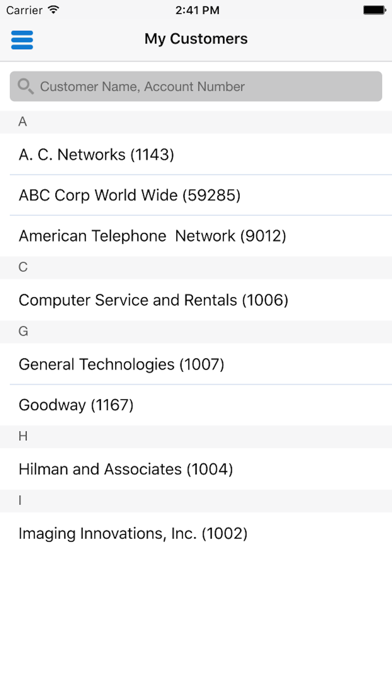
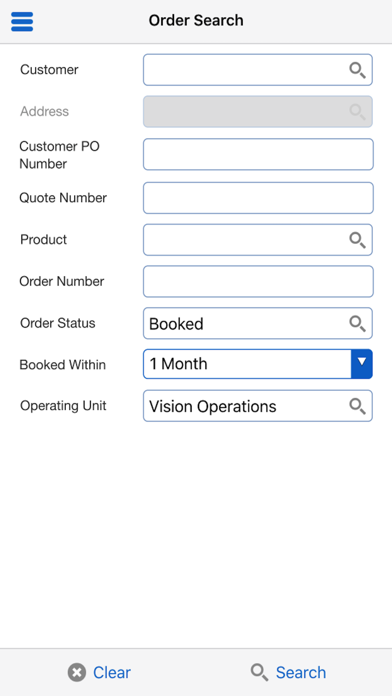
With Oracle Mobile Sales Orders for Oracle E-Business Suite, users can view the latest customer sales order status and take action on the go. - View orders via my customers list - Search orders by key attributes (customer, customer PO number, quote number, order number, status, and product) - View order and line details (customer, product, pricing, holds, shipping, invoice) - Monitor shipment alerts for holds and back orders - View Invoices for the selected order - Collaborate in transaction context with device features such as email, phone, and text Oracle Mobile Sales Orders for Oracle E-Business Suite is compatible with Oracle E-Business Suite 12.1.3 and 12.2.3 and above. To use this app, you must be a user of Oracle Order Management, with mobile services configured on the server side by your administrator. For information on how to configure mobile services on the server and for app-specific information, see My Oracle Support Note 1641772.1 at https://support.oracle.com. Note: Oracle Mobile Sales Orders for Oracle E-Business Suite is available in the following languages: Brazilian Portuguese, Canadian French, Dutch, English, French, German, Italian, Japanese, Latin American Spanish, Simplified Chinese, and Spanish.
What's new · 1.8.1
This is a minor release, so the latest app version will work with the last major version (N) and one previous major version (N-1) of the server-side patches. See My Oracle Support Note 1641772.1 at https://support.oracle.com
Details