

APRS Mobile
Gregory Carter · Travel
Independent analytics for this App Store listing. AppTracker is not affiliated with Gregory Carter.
Chart standing · US
What changed · US
Listing changes AppTracker has observed for this app in this storefront — new versions, price moves, rating shifts, and store copy.
Beacon the way your station actually works, and a fix for background beaconing. • Four ways to beacon, in Settings › Beaconing and from the beacon button on the map: Off, SmartBeacon, Every so often, and Fixed position. Tap the button and pick one — the panel shows which is in use. • Fixed position is for a home station: type your latitude and longitude once and beacon from it. No GPS, no location permission, no drift, no battery cost. • Every so often is the simple one: a beacon every so many seconds, from wherever you are, and an optional minimum distance so a parked station stays quiet. • Network TNC: send and receive over the air through a KISS TNC on your network — Direwolf on a Raspberry Pi, or a TNC behind a serial-to-WiFi bridge. Settings › Network TNC. It can be on at the same time as a Bluetooth TNC and the software modem. • Fixed: SmartBeacon could go quiet for a whole drive with the app in your pocket. iOS wakes the app on significant changes of position, and those positions are worked out from cell towers and Wi-Fi, so they are often too rough to publish — the app held every one of them back and never gave up waiting. It now sends one anyway once you have been quiet for your Slow Rate, because a position a few hundred metres out beats no position at all. • Also fixed: SmartBeacon's rates never applied in the background without High Precision. A wake-up carries no speed, so the app read every one as a station standing still and used your Slow Rate. It now beacons on each wake-up instead, never closer together than your Fast Rate, and says so under Settings › Beaconing › What Happens in the Background. • A typed latitude or longitude is no longer rounded to a tenth of a degree.
Price & rating history · US
Reconstructed from the listing changes AppTracker has observed in this storefront. A field is charted once it has changed more than once, and each line starts at the value it moved from.
Price · Free now · 2 changes on record
Ratings breakdown · US
The star breakdown behind this app's rating in this storefront.
In-app purchases · US
No in-app purchases.
Screenshots




Similar apps
Competitors and close alternatives, as estimated by AppTracker.


About
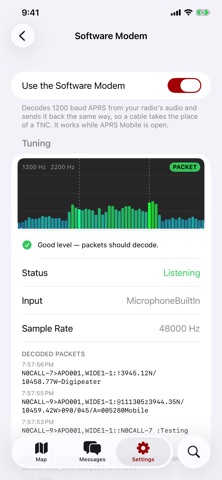
APRS Mobile connects your iPhone and iPad straight to APRS-IS, the internet side of the Automatic Packet Reporting System used by amateur radio operators worldwide. Watch the stations around you live, look up any station, message other hams and beacon your position. No account needed. Work over your own radio too — with a Bluetooth or network TNC, or with nothing but an audio cable and the built-in software modem. LIVE MAP • Stations appear the moment they're heard, with their APRS symbols and callsigns • Tracks, PHG circles and a Layers panel: fixed, mobile and weather stations, digipeaters, IGates and objects • A status bar shows your connection, the server and the traffic • Map switches for beaconing and Keep Screen On, so you can see at a glance when they're on • Via: one control for every link — APRS-IS, TNC and software modem STATION DETAILS • Tap a station for a quick card, then its full page, updated live • Last heard, beacon prediction, digipath, comment and status • Position, Maidenhead grid, speed, course, altitude and distance from you • Drag a card up for the digipath, how often it beacons and the raw packet • Current weather, plus weather and telemetry charts APRS MESSAGING • Chat with any station, with conversations and message bubbles • Messages go out over APRS-IS or straight over your radio; IGates carry them between the two • Automatic retries until acknowledged, with receipts • Notifications for messages to your callsign, even with the app closed • Block or report a station; offensive language is hidden behind a tap RADIO — TNC (OPTIONAL) • Connect a Mobilinkd TNC4, or a TNC3 on Bluetooth LE firmware, to send and receive over your own radio • Or reach a KISS TNC on your network: Direwolf on a Raspberry Pi, or a TNC on a serial-to-WiFi bridge • Choose how messages and beacons go out, and where map stations come from: radio, APRS-IS or both • Stays connected in the background, so beaconing and receiving carry on • A TNC and a radio are separate purchases; everything else works without them RADIO — SOFTWARE MODEM (OPTIONAL) • No TNC required: with an audio cable your phone is the modem — 1200 baud APRS decoded from your radio's audio • Transmit through a radio set to VOX, with adjustable TX delay and level • A live spectrum with both tones marked, a level check in plain language and a clipping warning • Receiving needs no licence; transmitting is off until you confirm you hold one OFFLINE MAPS • Download OpenStreetMap-based maps for the areas you care about, and the map works with no network • Pick a region or the area around you, see the size before you commit, and pause or resume BEACONING • Four ways to beacon, from Settings or the map: off, SmartBeaconing, every so often, or fixed • SmartBeaconing beacons more often when moving fast or turning, less when slow or stopped • Fixed position suits a home station: type it in once, and no GPS is used • Carries on in the background when you allow it, with a low-power mode • Choose your APRS symbol, comment and position ambiguity AND MORE • Search for any callsign, city or zip code • Imperial, metric and nautical units, any APRS-IS server, iPhone and iPad Anyone can watch APRS activity and weather stations. Sending messages or positions requires an amateur radio license; over APRS-IS it also needs the passcode for your callsign, and transmitting over the air has to be switched on by hand. The software modem uses the microphone to hear your radio. The audio is decoded on your device, never recorded and never sent. Weather and telemetry history charts, and offline map downloads, come from openaprs.ai; everything else comes straight from APRS-IS or your radio. Offline map data © OpenStreetMap contributors. Positions you send can be seen on other APRS websites too. Continued use of GPS running in the background can dramatically decrease battery life. A live APRS-IS feed uses a lot of data.
What's new · 1.3.0
Beacon the way your station actually works, and a fix for background beaconing. • Four ways to beacon, in Settings › Beaconing and from the beacon button on the map: Off, SmartBeacon, Every so often, and Fixed position. Tap the button and pick one — the panel shows which is in use. • Fixed position is for a home station: type your latitude and longitude once and beacon from it. No GPS, no location permission, no drift, no battery cost. • Every so often is the simple one: a beacon every so many seconds, from wherever you are, and an optional minimum distance so a parked station stays quiet. • Network TNC: send and receive over the air through a KISS TNC on your network — Direwolf on a Raspberry Pi, or a TNC behind a serial-to-WiFi bridge. Settings › Network TNC. It can be on at the same time as a Bluetooth TNC and the software modem. • Fixed: SmartBeacon could go quiet for a whole drive with the app in your pocket. iOS wakes the app on significant changes of position, and those positions are worked out from cell towers and Wi-Fi, so they are often too rough to publish — the app held every one of them back and never gave up waiting. It now sends one anyway once you have been quiet for your Slow Rate, because a position a few hundred metres out beats no position at all. • Also fixed: SmartBeacon's rates never applied in the background without High Precision. A wake-up carries no speed, so the app read every one as a station standing still and used your Slow Rate. It now beacons on each wake-up instead, never closer together than your Fast Rate, and says so under Settings › Beaconing › What Happens in the Background. • A typed latitude or longitude is no longer rounded to a tenth of a degree.
Details