

Tax Calc Aussie
Roy Alexandre Rollan · Finance
Independent analytics for this App Store listing. AppTracker is not affiliated with Roy Alexandre Rollan.
Chart standing · US
What changed · US
Listing changes AppTracker has observed for this app in this storefront — new versions, price moves, rating shifts, and store copy.
New: choose how many days a week you work. When you select Daily, you can now pick anywhere from 1 to 7 days a week (5 by default), and your yearly income, tax and take-home pay are worked out from the days you actually work. Also in this update: • Amounts always show in Australian dollars, whatever region your iPhone is set to. • Small refinements to the results screen. Every update starts with your feedback. If something isn't right, tell us and we'll look at it: help@lamigsoftware.com
Ratings breakdown · US
The star breakdown behind this app's rating in this storefront.
Screenshots



About
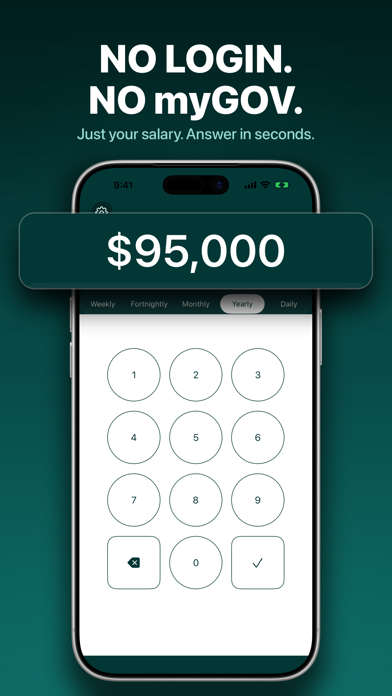
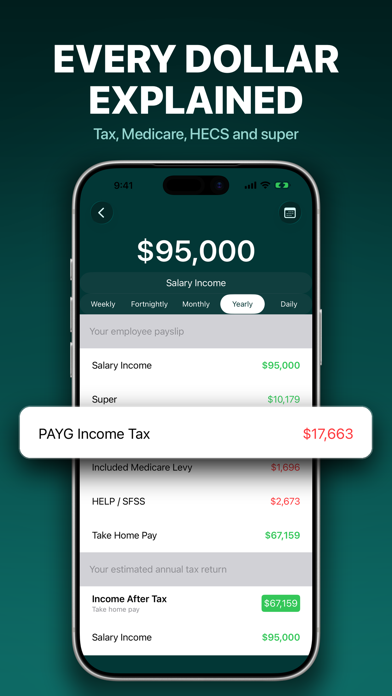
Tax Calc Aussie - Australia's easiest income tax and take-home pay calculator. No myGov. No myID. No login. No account. Just type in your salary and see your income tax, take-home pay and estimated refund in seconds. WHAT YOU GET - Take-home pay shown daily, weekly, fortnightly, monthly and yearly - Income tax, Medicare levy and the tax-free threshold, worked out for you - Medicare levy surcharge, including spouse and dependants - HELP/HECS and SFSS study loan repayments - Superannuation shown alongside your pay - Salary sacrifice - Dividend income with refundable franking credits - Seniors and pensioners tax offset (SAPTO) - An estimated tax refund for the year - Switch between financial years to compare HOW IT WORKS Type in your salary. Pick your pay period. That's it - no sign-up, no linking accounts, no verification codes sent to a phone you no longer own, no waiting on hold. COMMON QUESTIONS How much tax will I pay on my salary in Australia? Enter your annual salary and Tax Calc Aussie shows your income tax, Medicare levy and take-home pay for the current Australian financial year. What is my take-home pay after tax? The app shows your net pay daily, weekly, fortnightly, monthly and yearly, so you can see exactly what lands in your bank account each payday. Do I need a myGov or ATO account to use this? No. Tax Calc Aussie asks for a salary figure and nothing else. There is no login, no account, and no personal details required. Does it include HECS/HELP and the Medicare levy? Yes. Study loan repayments (HELP/HECS and SFSS), the Medicare levy and the Medicare levy surcharge are all included, and each can be toggled to match your situation. Can it handle salary sacrifice and dividends? Yes. You can enter salary sacrifice amounts and dividend income with refundable franking credits, and see how each changes your result. Will it estimate my tax refund? Yes. Alongside your payslip breakdown, the app shows an estimated annual tax position so you can see whether you're likely to get money back. Is it up to date? Yes - rates are updated for the current Australian tax year, including 2026-27, and you can switch financial years to compare. WHO IT'S FOR Employees checking a payslip, anyone weighing up a job offer or a pay rise, contractors and sole traders estimating what they'll owe, retirees with franked dividends, and anyone budgeting around their real take-home pay rather than their headline salary. FREE AND PAID Tax Calc Aussie is free to use and supported by ads. A single one-off in-app purchase removes ads for good - there is no subscription. Disclaimer: This calculator provides general estimates only. Your actual tax outcome may differ based on your personal circumstances and details this app cannot capture. Questions/feedback: help@lamigsoftware.com Privacy Policy: https://lamigsoftware.com/privacy Terms of Use: https://lamigsoftware.com/terms
What's new · 3.3.9
New: choose how many days a week you work. When you select Daily, you can now pick anywhere from 1 to 7 days a week (5 by default), and your yearly income, tax and take-home pay are worked out from the days you actually work. Also in this update: • Amounts always show in Australian dollars, whatever region your iPhone is set to. • Small refinements to the results screen. Every update starts with your feedback. If something isn't right, tell us and we'll look at it: help@lamigsoftware.com
Details