

Media Catalog
Jessica Tunnicliffe · Shopping
Independent analytics for this App Store listing. AppTracker is not affiliated with Jessica Tunnicliffe.
Chart standing · US
Screenshots




Keywords this app targets
Search terms AppTracker associates with this app — estimates, not search volume. ❝ = in the app's title; a highlighted number is its current position for that term.
Similar apps
Competitors and close alternatives, as estimated by AppTracker.
 My Media Shelf
Russell Shannon
1 shared title word
My Media Shelf
Russell Shannon
1 shared title word
 Home Library Catalog
Big S Dynamics
1 shared title word
Home Library Catalog
Big S Dynamics
1 shared title word
 DVD COLLECT
William Fuentes
DVD COLLECT
William Fuentes
 QuickSell Digital Cataloguing
Apport Software Solutions Private Limited
1 shared topic
QuickSell Digital Cataloguing
Apport Software Solutions Private Limited
1 shared topic
 My Movies 6 - Movie & TV List
Binnerup Consult
My Movies 6 - Movie & TV List
Binnerup Consult
 Catalog Maker : Brochure Maker
SPACE2CODE
1 shared title word
Catalog Maker : Brochure Maker
SPACE2CODE
1 shared title word
 iCollect Everything: Inventory
iCollect Everything, LLC
1 shared topic
iCollect Everything: Inventory
iCollect Everything, LLC
1 shared topic
 Stock Control Inventory
Pascal Meziat
1 shared topic
Stock Control Inventory
Pascal Meziat
1 shared topic
About
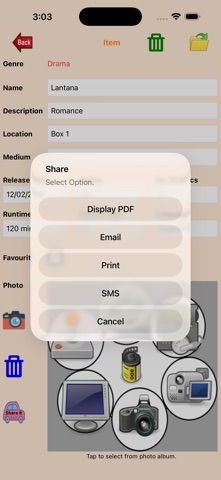
Media Catalog is created to help you keep a catalog of your collection of movies, game, music, etc. The catalog will be grouped based on the catalog type and genre. You have the option to print (single copy, multiple copies, or page range), display pdf file, SMS or email to your friends. There are four functions available: Manage Catalog Types - Enter the catalog types (e.g. movies, games, music), description and photo. You can select the catalog type photo from your photo album, delete selected photo or take a new photo. To search for a catalog type, simply enter the name and the description and photo will be shown. You can then change the description or photo if you wish. You can also delete unwanted catalog types. Deleting a catalog type will also delete all items and genres under that catalog type. Manage Genres - Enter the genre (e.g. drama, horror, etc.), description and photo. You can choose the genre photo from your photo album, delete selected photo, or take a new photo. To search for a genre, simply enter the genre name and the genre details will be displayed. You will also be able to change the description and the photo. You can also delete unwanted genres. Deleting a genre will delete all items under that genre. Manage Items - Details entered include name, description, location, medium, release date, rating, no. of discs, runtime, region code, language, photo and favourite. You can choose the photo from your photo album or take a new one. To search for the item, simply enter the name and the details will be displayed. You then have the option to change any of the details and the photo. Share - You can select all or selected types, genres or items to print, email or display as a pdf file. Alternately you can select all or selected favourite types, genres or items to print, email or display as a pdf file. There is also a 'Help' button to guide you in using this app.
What's new · 1.0.27
Bug fixes.
Details