

Subtitles Viewer!
Craig Grummitt · Utilities
Independent analytics for this App Store listing. AppTracker is not affiliated with Craig Grummitt.
Chart standing · US
What changed · US
Listing changes AppTracker has observed for this app in this storefront — new versions, price moves, rating shifts, and store copy.
The playback screen now shows the Subtitles Viewer logo on the black background, so it is clearer you are still in the app. Subtitles sit higher, and you can swipe up or down to move them.
Price & rating history · US
Reconstructed from the listing changes AppTracker has observed in this storefront. A field is charted once it has changed more than once, and each line starts at the value it moved from.
Average rating · ★ 4.36 now · 3 changes on record
In-app purchases · US
What this app sells inside itself, grouped by kind and priced for this storefront.
Screenshots


About
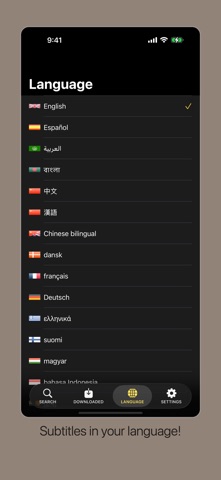
View subtitles on your iOS device synchronized with television or movies on your TV, or at the cinema. Brilliant for when you're at a cinema watching a movie, and you need subtitles in your native language! Great for the hard of hearing and deaf community. Satisfied users have described this app as "awesome" and "a godsend". Subscribe for unlimited subtitle downloads and uploads. If you prefer, extra download credits are available as in-app purchases. Download three subtitles for free. Subtitles available in English, Spanish(Español), Arabic(العربية), Bengali, Chinese(中文), Danish(dansk), Dutch(Nederlands), French(français), German(Deutsch), Greek(ελληνικά), Japanese(日本語), Javanese(basa Jawa), Hebrew(עברית), Italian(italiano), Korean(한국어), Malay(bahasa Melayu), Polish(język polski), Portuguese(português), Punjabi, Russian(русский язык), Sweden(Svenska), Thai(ไทย), Turkish(Türkçe) and Vietnamese(Tiếng Việt). Subtitles are downloaded from the huge database of subtitles at opensubtitles.org. As subtitles are contributed to opensubtitles by volunteers, the time it takes for subtitles to become available after a movie release can vary. Unlimited Subscription: • Monthly unlimited downloads and uploads • Annual unlimited downloads and uploads Payment is charged to your Apple ID account at confirmation of purchase. The subscription renews automatically unless auto-renew is turned off at least 24 hours before the end of the current period. Your account will be charged for renewal within 24 hours prior to the end of the current period. You can manage or cancel your subscription in iOS Settings, or at https://apps.apple.com/account/subscriptions. Privacy Policy: https://www.interactivecoconut.com/privacy-policy/ Terms of Use: https://www.interactivecoconut.com/terms-of-use/
What's new · 4.1
The playback screen now shows the Subtitles Viewer logo on the black background, so it is clearer you are still in the app. Subtitles sit higher, and you can swipe up or down to move them.
Details