

Exam Countdown - School & Uni
ROOT38 LIMITED · Education
Independent analytics for this App Store listing. AppTracker is not affiliated with ROOT38 LIMITED.
Chart standing · US
What changed · US
Listing changes AppTracker has observed for this app in this storefront — new versions, price moves, rating shifts, and store copy.
iOS 27 Ready! A bigger widget, and a round of fixes for the Home Screen. • New: the Upcoming Exams widget, formerly Next 4 Exams, now comes in an extra-large size that shows up to eight exams at once. Find it on iPad, and on iPhone with iOS 27. Widgets already on your Home Screen keep working. • Exam alerts now stay in Notification Centre until you clear them. Opening the app used to remove them, so it could look as though they never arrived. • A new Enable Alerts switch in Settings lets you turn exam alerts on at any time, even if you skipped them when you first set up the app. • Widgets could show as a blank white rectangle when the Home Screen was set to Clear or Tinted. They now follow whichever look you have chosen, and the Live Countdown widget keeps its icon artwork. • An exam someone shared with you can no longer be edited by accident. Only the person who created it can make changes. • On iOS 27, close buttons show an X again instead of a square, and the category title at the top of your exam list stays readable. • Filtering by a category with nothing in it now offers "Show All Exams", in every language. Thank you to everyone who wrote in about the blank widgets. That is how this one was found.
Ratings breakdown · US
The star breakdown behind this app's rating in this storefront.
In-app purchases · US
What this app sells inside itself, grouped by kind and priced for this storefront.
Screenshots


About
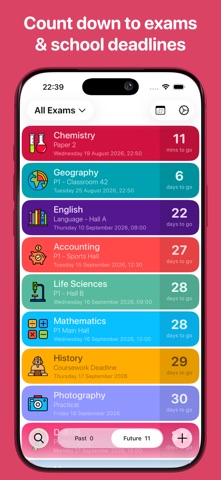
Exam Countdown is the beautifully simple countdown, planner and widget app for every exam that matters. Counting down since 2015, rated 4.7 stars from over 30,000 ratings. The original exam countdown app, used by students, teachers and schools in over 100 countries. Count down to the ones that count: matric prelims, trials and NSC finals, GCSE and A Level papers, IB, SQA Highers, university finals, coursework and homework deadlines, driving theory, music grades and every test in between. CALENDAR VIEW See your whole semester on a month grid, color coded, with every exam a tap away. LIVE COUNTDOWN WIDGETS A Home Screen widget that ticks every second, plus Next Exam, Next 4 Exams and Lock Screen widgets. LIVE ON YOUR LOCK SCREEN Live Activities put your next exam on the Lock Screen and in the Dynamic Island as it approaches. MAKE IT YOURS Hundreds of icons, every color, categories to group your subjects, and notes on any exam. Free version: • Unlimited exam countdowns, all in one place • Count down in years, months, weeks, days, hours, minutes and seconds • Color code your exams • Choose from 400 icons • Add notes to any exam • Invite friends and family to count down with you • Notifications before every exam Premium version: • Ad free • The full widget collection, including the second by second Live Countdown • Live Activities on your Lock Screen and Dynamic Island • Calendar View • Categories to group your subjects • Detailed alerts, with your choice of alert sound • Record and review your exam results • Sync across all your Apple devices • All 400 color icons and 70 colors Exam Countdown is free to download and use. Premium is available as a yearly subscription or as a one off lifetime purchase. Terms of Use - https://www.root38.com/terms-and-conditions/ Privacy Policy - https://www.root38.com/privacy-policy/
What's new · 5.8
iOS 27 Ready! A bigger widget, and a round of fixes for the Home Screen. • New: the Upcoming Exams widget, formerly Next 4 Exams, now comes in an extra-large size that shows up to eight exams at once. Find it on iPad, and on iPhone with iOS 27. Widgets already on your Home Screen keep working. • Exam alerts now stay in Notification Centre until you clear them. Opening the app used to remove them, so it could look as though they never arrived. • A new Enable Alerts switch in Settings lets you turn exam alerts on at any time, even if you skipped them when you first set up the app. • Widgets could show as a blank white rectangle when the Home Screen was set to Clear or Tinted. They now follow whichever look you have chosen, and the Live Countdown widget keeps its icon artwork. • An exam someone shared with you can no longer be edited by accident. Only the person who created it can make changes. • On iOS 27, close buttons show an X again instead of a square, and the category title at the top of your exam list stays readable. • Filtering by a category with nothing in it now offers "Show All Exams", in every language. Thank you to everyone who wrote in about the blank widgets. That is how this one was found.
Details