

spectrum eye RTA
Naumenko Oleg · Music
Independent analytics for this App Store listing. AppTracker is not affiliated with Naumenko Oleg.
Chart standing · US
What changed · US
Listing changes AppTracker has observed for this app in this storefront — new versions, price moves, rating shifts, and store copy.
* 2 - plot layout on iPad, displays spectrum and spectrogram at the same time. * Replaced the audio engine with a newer, faster one * Fixed spectrogram stuttering when opening the app * Improved UI layout, readability and clarity. * Implemented steps nessesary for iPhone Duo support
Price & rating history · US
Reconstructed from the listing changes AppTracker has observed in this storefront. A field is charted once it has changed more than once, and each line starts at the value it moved from.
Price · 14.99 USD now · 2 changes on record
Average rating · ★ 4.86 now · 2 changes on record
Ratings breakdown · US
The star breakdown behind this app's rating in this storefront.
In-app purchases · US
No in-app purchases.
Screenshots

Similar apps
Competitors and close alternatives, as estimated by AppTracker.
 Spektral Mobile
Matrix Productions Ltd
Spektral Mobile
Matrix Productions Ltd
 SonoSpec: Audio Spectrum RTA
Corey Thomas Slick
SonoSpec: Audio Spectrum RTA
Corey Thomas Slick
 Spectrum Analyzer RTA
ONYX Apps
Spectrum Analyzer RTA
ONYX Apps
 SpectrumView Plus
Oxford Wave Research Ltd.
SpectrumView Plus
Oxford Wave Research Ltd.
 Sound Spectrum Pro
Calin Andrian Albescu
Sound Spectrum Pro
Calin Andrian Albescu
 SoundScope: Audio Analyzer
Waldemar Schneider
SoundScope: Audio Analyzer
Waldemar Schneider
 PocketRTA Ultra
Limelight Software
PocketRTA Ultra
Limelight Software
 FFT
Andrew Smith
FFT
Andrew Smith
About
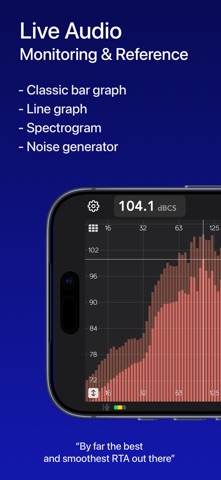
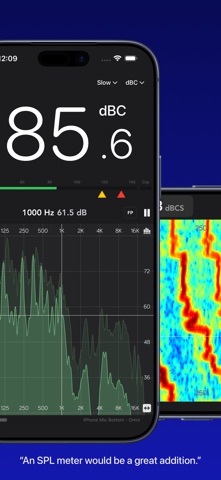
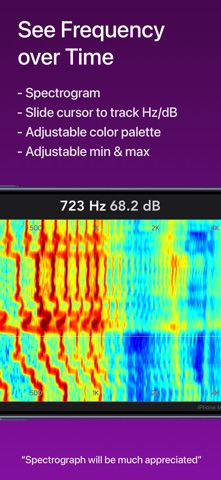
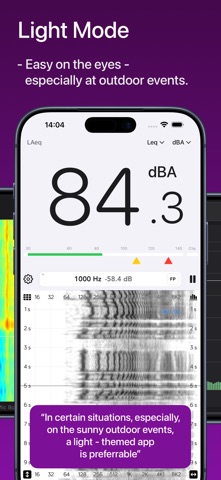
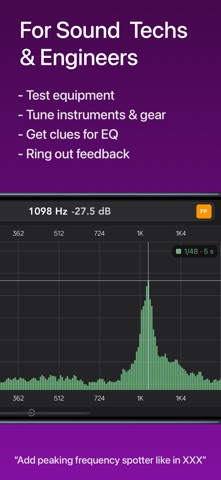
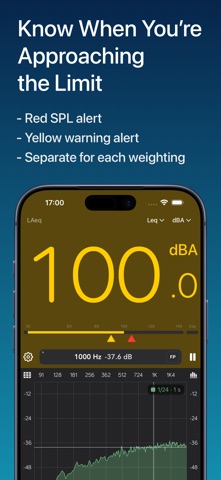
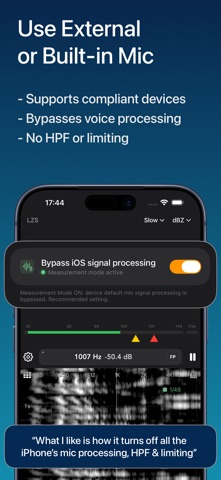
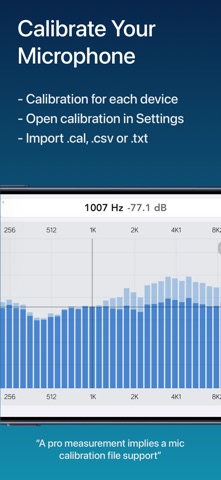
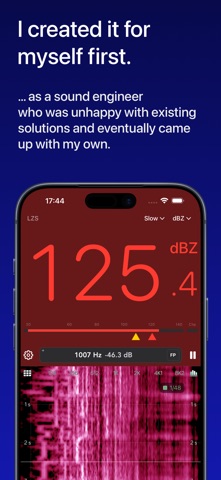
A Lifetime purchase. No Subscriptions. Spectrum Eye shows the frequency content of what your mic or interface is hearing - smoothly, at high FFT sizes, without freezing the UI. Version 2 is a full rebuild: Metal plot, bars / line / spectrogram, calibrated SPL, and mic correction on the live spectrum. For music professionals, audio engineers, sound technicians, installers, car audio, and audio students. Equally at home as a quick check or a plot you leave running. WHAT YOU CAN DO • Monitor sound quality at concerts and rehearsals • Ring out feedback in stage monitors • Find resonances in rooms, boxes, instruments and cars • Check spectral balance of playback in the studio • Practice frequency-aware hearing • Measure SPL with A / C / Z weighting and Fast / Slow / Leq PLOT • Bars, line, and spectrogram - the configuration button is in the top right corner • Fractional-octave resolution from 1/1 through 1/96 • Line smoothing follows the same octave map • Peak hold with a slow release, optional fill under the line • Find Peak (FP) tracks the loudest band in the visible range • Classic or Overlay layout treats plot area vs scales differently; Overlay is the default • Pan, pinch-zoom, and a live cursor in Hz and dB • Frequency visible range presets (Full 8 Hz–22 kHz, Audio, Lows, Mids, Highs) • Magnitude-range presets • Spectrogram duration, Jet / Viridis / Inferno / Grayscale color palette • Light, Dark, or System appearance, plus a custom plot color • Spectrum update rate: 60 fps Smooth, 30 fps Efficient, or Auto (drops under heat or Low Power Mode) SPL • IEC-style meter: Fast, Slow, and Leq • A, C, and Z (flat) frequency weighting • Per-route SPL offset so you can calibrate against a reference • Yellow / red SPL alarm thresholds per weighting, with UI tinting • Clip indicator and a 30–140 dB level meter bar • iPhone: Large panel in portrait device orientation; in landscape orientation, compact readout in the top bar • iPad: switchable large and compact SPL mode INPUT AND CALIBRATION • Built-in mics (including iPad position / directivity where the device offers them) • External microphones and class-compliant audio interfaces • iOS measurement mode to bypass built-in HPF, EQ, and AGC (recommended) • Import mic calibration files (.cal, .txt, .csv); optional phase column is ignored • Per-route calibration curve and IEC weighting on the live spectrum • Pink noise generator, including with the screen off (Lock Screen / Now Playing) ANALYSIS • FFT sizes 4K / 8K / 16K / 32K (default 16K) • Fall-rate presets: 50 ms, 100 ms, 250 ms, 500 ms, 1 s, 5 s per 6 dB • Nominal capture sample rate - 48 kHz, display ranges from 8 Hz to 22 kHz Audio is processed on the device. Spectrum Eye does not record, store, or upload your audio. Suggestions welcome - the app is in active development. Includes In - app purchases: tips to the developer only. All the functionality is available once you download the app.
What's new · 2.1
* 2 - plot layout on iPad, displays spectrum and spectrogram at the same time. * Replaced the audio engine with a newer, faster one * Fixed spectrogram stuttering when opening the app * Improved UI layout, readability and clarity. * Implemented steps nessesary for iPhone Duo support
Details