

MelodyLab
Mats Eriksson · Music
Independent analytics for this App Store listing. AppTracker is not affiliated with Mats Eriksson.
Chart standing · US
What changed · US
Listing changes AppTracker has observed for this app in this storefront — new versions, price moves, rating shifts, and store copy.
Ratings breakdown · US
The star breakdown behind this app's rating in this storefront.
Screenshots
About
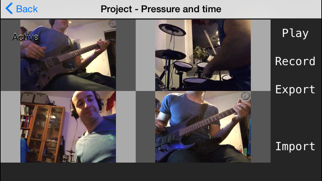
Record a video of yourself when you play an instrument or sing, then add more recordings and create your own song. When finished, export video to photo album and share it with your friends. With MelodyLab you can be your own band! Instructions: 1. Start MelodyLab, select 'New Project' and name it. 2. Select project in list and click 'Open'. 3. When you open your project, the first recording box is already selected. Just tap 'Record' when you are ready to record. When you are done, tap 'Stop'. If you're not satisfied, press record again. 4. Choose another recording box and tap 'Record'. Repeat this procedure until you have filled all the boxes and are satisfied with your recordings. 5. You can re-record any frame in which order you like. 6. Select Play to see your result and maybe adjust volumes. 7. When finished click Export to save video to photo album. Tip: In settings you can choose which camera and microphone to use. You can also adjust the video quality. Always use earphones to get rid of feedback/echoing * You can also start by importing a video from your album. Maybe cooperate with a talented singer/drummer/guitarist? Support: info@melody-lab.com
What's new · 1.8
Added new layout with a nice background. Also support for older devices.
Details