

Text to Speech!
Gwyn Durbridge · Productivity
Independent analytics for this App Store listing. AppTracker is not affiliated with Gwyn Durbridge.
Chart standing · US
What changed · US
Listing changes AppTracker has observed for this app in this storefront — new versions, price moves, rating shifts, and store copy.
New • Edit starred phrases: press and hold a starred phrase to edit its text. • Better phrase import and export: exported files now keep your folders and the order of your phrases. You can also import a plain text file, one phrase per line. Fixed • Stop, rewind, forward and tap-to-speak now behave reliably on iOS 27. • The first tap on Speak after opening the app or changing voice sometimes did nothing.
Ratings breakdown · US
The star breakdown behind this app's rating in this storefront.
In-app purchases · US
What this app sells inside itself, grouped by kind and priced for this storefront.
Screenshots



About
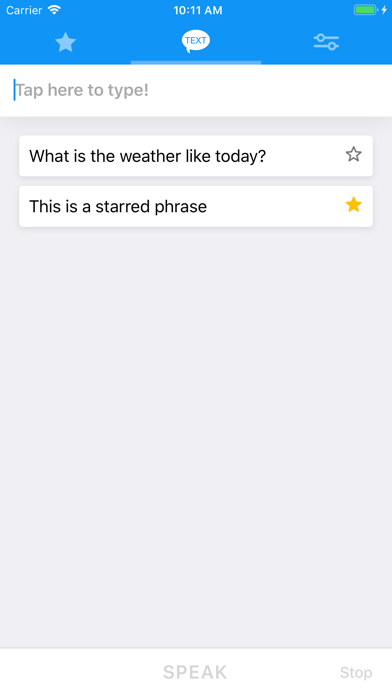
Bring your text to life with Text to Speech! Text to speech produces natural sounding synthesised text from the words that you have entered in. With 178 different voices to choose from and the ability to adjust the rate and pitch, there are countless ways in which the synthesised voice can be adjusted. Features ------------------------- - 178 Different voices to choose from - Voices are available in 63 different accents & languages - No internet required - The ability to adjust the pitch and rate - Speak as you type - Highlight spoken text - Star your favourite phrases - Group starred phrases into folders - Export speech into audio files - Mix speech into your phone calls - Supports personal voices (requires iOS 17) Voices ------------------------- Arabic (World) Basque (Spain) Bengali (India) Bhojpuri (India) Bulgarian (Bulgaria) Catalan (Spain) Chinese (China mainland) Chinese (Hong Kong) Chinese (Liaoning, Mainland China) Chinese (Shaanxi, Mainland China) Chinese (Sichuan, Mainland China) Chinese (Taiwan) Croatian (Croatia) Czech (Czechia) Danish (Denmark) Dutch (Belgium) Dutch (Netherlands) English (Australia) English (India) English (Ireland) English (Scotland, UK) English (South Africa) English (United Kingdom) English (United States) Finnish (Finland) French (Belgium) French (Canada) French (France) Galician (Spain) German (Germany) Greek (Greece) Hebrew (Israel) Hindi (India) Hungarian (Hungary) Indonesian (Indonesia) Italian (Italy) Japanese (Japan) Kannada (India) Korean (South Korea) Malay (Malaysia) Marathi (India) Norwegian Bokmål (Norway) Persian (Iran) Polish (Poland) Portuguese (Brazil) Portuguese (Portugal) Romanian (Romania) Russian (Russia) Shanghainese (China mainland) Slovak (Slovakia) Slovenian (Slovenia) Spanish (Argentina) Spanish (Chile) Spanish (Colombia) Spanish (Mexico) Spanish (Spain) Swedish (Sweden) Tamil (India) Telugu (India) Thai (Thailand) Turkish (Turkey) Ukrainian (Ukraine) Vietnamese (Vietnam) Notes ------------------------- - More voices are available in system settings Go Settings -> Accessibility -> Spoken Content -> Voices
What's new · 4.74
New • Edit starred phrases: press and hold a starred phrase to edit its text. • Better phrase import and export: exported files now keep your folders and the order of your phrases. You can also import a plain text file, one phrase per line. Fixed • Stop, rewind, forward and tap-to-speak now behave reliably on iOS 27. • The first tap on Speak after opening the app or changing voice sometimes did nothing.
Details