

Car Camera Recorder
Beling.pl · Navigation
Independent analytics for this App Store listing. AppTracker is not affiliated with Beling.pl.
Chart standing · US
What changed · US
Listing changes AppTracker has observed for this app in this storefront — new versions, price moves, rating shifts, and store copy.
- Fix for 4K recording when the resolution doesn't support multiple cameras (you can now select separate resolutions for single camera and multi-camera modes) - New split-screen option for simultaneously displaying statistics and a map with camera feeds - The new watch app shows the current recording status, but only includes a few pieces of information, such as current battery level, trip information, phone charging, free memory space, etc.
Ratings breakdown · US
The star breakdown behind this app's rating in this storefront.
In-app purchases · US
What this app sells inside itself, grouped by kind and priced for this storefront.
Screenshots


About
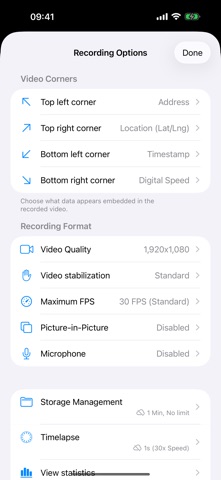
Car Camera Recorder is a powerful, ad-free dashcam application designed to turn your iPhone into a professional car recorder. Capture your drives in high detail while embedding crucial telemetry data directly into your videos. Key Features: Live Preview & Manual Focus - View exactly what is being recorded in real-time. - Tap to manually focus the camera. - Easily zoom in, zoom out, or reset zoom levels. Dynamic Video Overlays - Embed real-time telemetry data in any of the four corners of your video. - Display current speed in km/h or mph. - Display current GPS coordinates (latitude/longitude). - Display current address (street, city, or full address). - Display current frame rate (FPS). - Display total trip distance and elapsed trip time. - Customize overlay appearance: choose font size, text color, and optional semi-transparent background. Visual Speed & Digital Gauges - Add a customizable, graphic speedometer dial or a retro-futuristic 7-segment digital display overlay directly on your recording. - Fully customize the gauge appearance: adjust colors (neon green, cyan, yellow, red, and more), size, and speed units. Dual Camera Picture-in-Picture (PiP) - Record from the main back camera with a simultaneous front-facing camera overlay. - Customize the PiP overlay position, size (small, medium, large), and shape (rectangle, rounded, or circle). High-Performance Recording - Select video resolutions up to 4K. - Choose frame rates up to 60 FPS for ultra-smooth video. - Prioritize and customize video stabilization modes. Smart Loop & Storage Management - Automatically split recordings into chunks (1 to 60 minutes, or no limit). - Set storage limits (keep the last 10 to 100 files, or no limit) to automatically clean up old, unprotected files. - Toggle iCloud backup per video type to save your cloud storage space. Timelapse Recording - Automatically record timelapse videos alongside your normal driving footage with customizable intervals. Stealth & Battery Saving Mode - Dim the screen and hide UI elements during recording to reduce distraction and conserve battery. Detailed Trip History & Analytics - View full trip summaries with start/end times, total distance, duration, top speed, and average speed. - Interactive map showing your driven route. - Interactive speed-over-time graph. - Local weather conditions captured during the trip. - Manage recorded videos: play, export, delete, or lock files to prevent automatic deletion. - Export trip routes to GPX format for use in other apps. - View storage estimates and storage usage statistics. - Lifetime driving stats dashboard showing total trips, videos, timelapses, combined storage size, and total time on the road. - Supercharged background loading of trip details and telemetry to ensure smooth performance. No ads, no trackers. Support the app by becoming a Supporter to unlock cabin audio recording and road noise audio enhancement. Term of Use (EULA): https://www.apple.com/legal/internet-services/itunes/dev/stdeula/
What's new · 10.1
- Fix for 4K recording when the resolution doesn't support multiple cameras (you can now select separate resolutions for single camera and multi-camera modes) - New split-screen option for simultaneously displaying statistics and a map with camera feeds - The new watch app shows the current recording status, but only includes a few pieces of information, such as current battery level, trip information, phone charging, free memory space, etc.
Details