

Kuu3D
Hirofumi Tanjo · Graphics & Design
Independent analytics for this App Store listing. AppTracker is not affiliated with Hirofumi Tanjo.
Chart standing · US
Screenshots


About
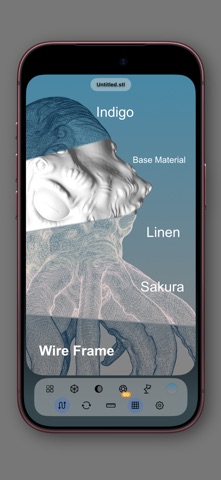
3D data, beautifully and clearly. Kuu3D is a 3D viewer for iPhone and iPad. It supports USDZ, OBJ, STL, glTF / GLB and PLY (point cloud). Open files from the Files app, AirDrop, or the Share sheet of other apps. EASY TO LOOK AT Operate with your fingertips. Rotate with one finger, pan and zoom with two, double-tap to show the whole model. Switch between softly shaded MatCap materials to study the form itself. (Partly free) Sky, dusk, night, or sakura: choose a background to suit your mood and your data. (Partly free) Wireframe view to check the flow of the mesh. (Partly free) Drag to change the light direction. (Paid feature) Change the field of view to adjust perspective. (Paid feature) Turntable mode slowly rotates the model so you can take it all in. (Free users get a half turn) HANDY FOR CHECKING See dimensions. The unit is guessed from the file format and can be changed. (Box display is a paid feature) Get notified when a model’s face directions (normals) look reversed. Large files are displayed as smoothly as possible. SIMPLE AND PRIVATE Save your favorite files in the library. No network access. Your files never leave the device, and no personal data is collected. The basic features are free. With the one-time purchase “Unlock All Features,” everything is unlocked (it is not a subscription). SUPPORTED FORMATS USDZ / USD, OBJ, STL, glTF / GLB, PLY (point cloud) Note: animation playback is not supported. What’s New (1.0): First release.
Details