

MD Yohaku
Yuki Otsue · Productivity
Independent analytics for this App Store listing. AppTracker is not affiliated with Yuki Otsue.
Chart standing · US
What changed · US
Listing changes AppTracker has observed for this app in this storefront — new versions, price moves, rating shifts, and store copy.
• Math: write LaTeX the same way as on GitHub — $…$ inline, or between $$ lines for a block (```math works too). • In the M↓ view, tables now appear as ruled tables and bullet lists as dots. Tap a checklist circle to mark it done. • In the M↓ view, the syntax stays hidden while you read and appears only while you write. • Rename the “Folders” heading to anything you like (from the … menu). • On iPad, press ⌘F on a keyboard to find text in a note. • Faster typing in long notes, and bug fixes.
Screenshots



About
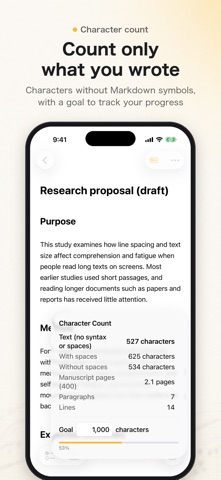
MD Yohaku is a Markdown note app that handles math, too. Write lecture and seminar notes, notes on papers, and drafts as easily as in the built-in Notes app. Your notes are always plain Markdown text. FOR RESEARCH • Lecture and seminar notes: LaTeX written with $…$ or $$ is typeset as math in the M↓ view • Notes on papers: results become ruled tables, and things to check become checklists you can tap • Drafts with a length limit: count the text without Markdown symbols and spaces, and set a goal to see how far you are • Plain .md files: exported notes show the same math on GitHub and work with tools like Pandoc. The math is plain LaTeX, so you can paste it into a LaTeX manuscript • Claude on Mac: with the bundled MCP server, Claude Desktop and Claude Code can summarize and organize your notes (only when you allow it in Settings) MATH • Write LaTeX math the same way as on GitHub: $…$ inline, or between $$ lines for a block (```math works too) • It's plain Markdown, so exported .md files show the same math on GitHub and elsewhere WRITING • Headings, bold, lists, checklists, tables, and code are styled while the syntax stays in place • Tap the M↓ button to hide the syntax for a clean reading view, with ruled tables and checklists you can tap to complete • Press Return on a list item and the list continues • On Mac, switch line formats with menus and keyboard shortcuts • Version history keeps up to 20 earlier versions of each note, so you can always go back CHARACTER COUNT • Counts the text without Markdown symbols and spaces • Lines, to-dos, and Japanese manuscript-sheet pages • Set a goal and watch your progress SYNC AND PRIVACY • Syncs across iPhone, iPad, and Mac with iCloud • Notes are stored only in your own iCloud, with note bodies encrypted. The developer can't read them • No ads, no analytics, no tracking FILES • Open .md files to import them as notes • Export a note as .md, or a folder or all notes as .zip MAC ONLY • Includes an MCP server so Claude Desktop and Claude Code can read and write your notes (only when you allow it in Settings) FREE AND PRO The free version lets you create up to 5 notes. MD Yohaku Pro, a one-time purchase, unlocks unlimited notes on all your devices with the same Apple Account.
What's new · 1.2
• Math: write LaTeX the same way as on GitHub — $…$ inline, or between $$ lines for a block (```math works too). • In the M↓ view, tables now appear as ruled tables and bullet lists as dots. Tap a checklist circle to mark it done. • In the M↓ view, the syntax stays hidden while you read and appears only while you write. • Rename the “Folders” heading to anything you like (from the … menu). • On iPad, press ⌘F on a keyboard to find text in a note. • Faster typing in long notes, and bug fixes.
Details