

SpendPix: AI Receipt Tracker
ADARSH KUMAR YADAV · Finance
Independent analytics for this App Store listing. AppTracker is not affiliated with ADARSH KUMAR YADAV.
Chart standing · US
What changed · US
Listing changes AppTracker has observed for this app in this storefront — new versions, price moves, rating shifts, and store copy.
Screenshots


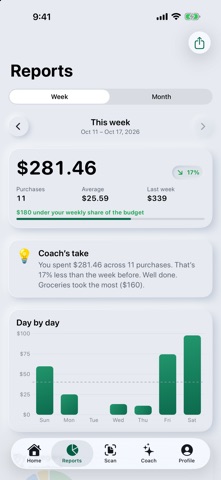


About
SpendPix turns a photo of a receipt into a tidy expense. Point your camera at a receipt and AI reads the shop, the date, each item, the tax and the total, picks a category, and lets you check everything before it's saved. No receipt? Add an expense by hand in a few taps. SNAP A RECEIPT - AI reads every line: items, tax, total and date - Automatic categories: groceries, dining, transport and more - Works in your currency, with approximate conversion for other currencies SEE WHERE YOUR MONEY GOES - Clear weekly and monthly reports - Compare with last week or last month - Top categories and shops at a glance - Set a monthly budget and see your pace - Share a report card as an image MONEY COACH Ask questions about your own spending: where did my money go, how much can I still spend this month, where can I cut back? The Coach answers from your numbers. Tips are general information, not financial advice. PRIVATE BY DESIGN - Your expenses and receipt photos stay on your iPhone and are backed up privately to your account, so they come back when you sign in on a new iPhone - SpendPix AI is optional and asks first. Without it, receipts are read on your iPhone - Delete your account and all your data at any time, right in the app - Available in English, Spanish, French, German, Italian, Portuguese, Hindi, Japanese, Korean and Chinese SPENDPIX PRO Free includes a few AI receipt scans and Coach questions every month. SpendPix Pro unlocks unlimited AI scans, the full Money Coach and all reports, with weekly or monthly auto-renewing subscriptions. Payment is charged to your Apple Account at confirmation of purchase. Subscriptions renew automatically unless cancelled at least 24 hours before the end of the current period, and you can manage or cancel them in your App Store account settings. Terms of Use: https://www.adarshyadav.com/apps/spendpix/terms Privacy Policy: https://www.adarshyadav.com/apps/spendpix/privacy
Details