

Wada Sanzo Color Palettes
Kurt Higa · Graphics & Design
Independent analytics for this App Store listing. AppTracker is not affiliated with Kurt Higa.
Chart standing · US
What changed · US
Listing changes AppTracker has observed for this app in this storefront — new versions, price moves, rating shifts, and store copy.
The search field now appears as soon as you open Search, with no need to pull down.
Price & rating history · US
Reconstructed from the listing changes AppTracker has observed in this storefront. A field is charted once it has changed more than once, and each line starts at the value it moved from.
Average rating · ★ 0.00 now · 2 changes on record
Screenshots


Similar apps
Competitors and close alternatives, as estimated by AppTracker.


About
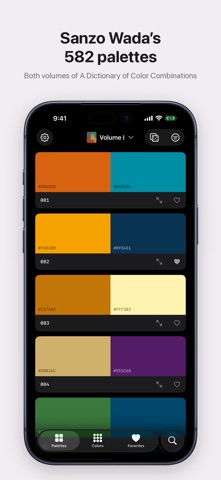
Sanzo Wada’s A Dictionary of Color Combinations, made for working designers. Every palette from both volumes — 582 combinations of 330 named colors — with the book’s printed CMYK and every value you need, one tap from your clipboard. A tool, not a feed: no ads, no subscriptions, no account. One purchase, both volumes, and it works offline. Palettes from both books • All 348 combinations from Volume I and 234 from Volume II, one palette per row • Volume II organized as in the book: the twelve months, and design categories from kimono and clothing to tapestry, earthenware and book design • Filter by collection, number of colors or hue — or open a random palette when you need a spark • Turn the page with ‹ › under any palette, or the arrow keys on iPad Exact values • CMYK exactly as printed in the books, checked against the pages • HEX, RGB, HSB and LAB for every color — tap any value to copy it • Copy HEX codes the way your tools want them: uppercase or lowercase, with or without # Every color at a glance • All 330 colors, each row filled with its color • Drag the strip along the right edge to preview and jump to any color • Japanese names and readings for Volume II colors • See every palette a color appears in, the same color in the other volume, and its closest neighbors Tools for real work • Match any hex code to the closest Wada colors, ranked by ΔE 2000 • Check contrast: every pairing in a palette, graded for text against WCAG AA and AAA • Export Adobe Swatch Exchange (.ase) files in RGB or the book’s CMYK for Photoshop, Illustrator, InDesign and Affinity • Export Procreate swatches, or copy HEX codes and CSS variables • Share story cards, transparent swatches, detail sheets, or a 2048 × 2048 image of any color for your moodboards Yours, on every device • Favorite palettes and colors; they sync between your iPhone and iPad with iCloud • Designed for iPhone and iPad, in light and dark mode • No data collected About the colors The CMYK values are the books’ printed values. On-screen colors are converted from them with Japan Color 2001 Coated, the standard profile for Japanese offset printing — as close to the page as a screen allows. Terms of Use: https://kurthiga.com/wada-color-palettes/terms-of-use Privacy Policy: https://kurthiga.com/wada-color-palettes/privacy-policy
What's new · 1.0.1
The search field now appears as soon as you open Search, with no need to pull down.
Details