

Lutsy: Film Photo Editor
Ed Rosie · Photo & Video
Independent analytics for this App Store listing. AppTracker is not affiliated with Ed Rosie.
Chart standing · US
Screenshots




About
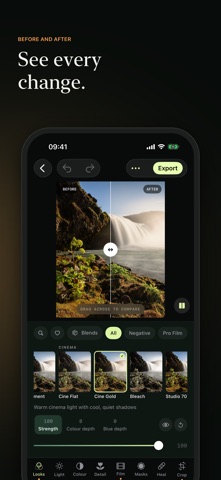
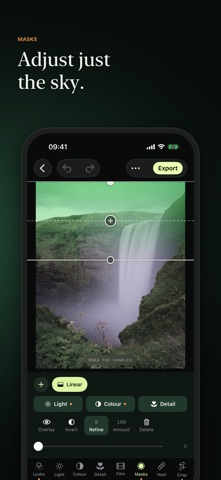
Lutsy is a photo editor built around film. Proper colour, proper grain, and the tools you'd normally sit down at a desk for. Start with a look. There are 95 of them. Portrait stocks, slide film, cinema grades, cheap compacts, infrared, cross process. They're tuned on real photos, skin included, and every one goes up or down to taste. Then get stuck in. Each tab is one row of settings and one slider, so nothing's buried three menus deep. Press and drag on any setting to nudge it without moving your thumb. LIGHT AND COLOUR - Exposure, contrast, highlights, shadows, whites, blacks and curves. White balance, a colour mixer, point colour and three-way grading. MASKS - Pick out the sky, a subject or a person in one tap, or brush in your own. Linear and radial gradients, colour and brightness ranges. Every light, colour and detail control works inside a mask. FILM CHARACTER - Grain, halation, bloom, light leaks and burns from any edge. Dust, hairs, scratches and stains. Motion blur you can paint exactly where you want it. DETAIL AND CLEAN-UP - Clarity, texture, dehaze, sharpening and noise reduction. Heal, clone and remove. CROP AND FRAME - Any ratio, auto straighten, and Upright for leaning buildings. Preview how a shot sits in an Instagram post or story before you share it. COMPARE - Before and after, side by side or top to bottom. Or put your edit up against any other look. EXPORT - JPEG, HEIF, 16-bit TIFF and PNG. Full size, an Instagram-ready size, or straight to the clipboard. Camera details kept, location only if you want it. RAW - Shoot RAW? Bring it in. Full white balance control included. NOTHING LEAVES YOUR PHONE - Everything runs on device. No account, no uploads, no tracking. Your originals are never touched. LUTSY PRO - Lutsy is free to download and free to use. Every look and tool is open to try, and anything made with the free tools exports at full resolution with no watermark. Pro unlocks export for edits that use Pro looks and tools. Monthly, or yearly with a free week to start. Payment is taken from your Apple ID when you confirm, or when the free week ends. Subscriptions renew automatically unless cancelled at least 24 hours before the end of the current period. Manage or cancel any time in your Apple ID settings. Terms of use: https://edrosie.com/playground/lutsy-terms Privacy policy: https://edrosie.com/playground/lutsy-privacy
What's new · 1.0.7
We've only just launched and this is a massive update. Here’s everything new. COLOUR GRADING, PROPERLY All four grading wheels side by side, like a real grading panel, with a brightness slider under each. Open any wheel large for fine work. Hold the puck still for a moment and it switches to precision mode. See exactly which tones you’re grading: the photo highlights the range as you move a wheel. New grade presets to start from: Teal and orange, Warm shadows, Cool highlights, Golden hour, Moonlight and Cross-process. EDITING Full screen. Hide every tool and just look at your photo, then pinch or double-tap to zoom. Colour is reorganised into Basic, Mixer, Point, Grading and Calibrate. A loupe when picking colours, so you can see exactly what you’re choosing. Auto tells you what it changed, and a second tap puts things back. Heal has a Compare button, to check a fix before moving on. Cropping fills the screen as you go, and pulling the crop wider takes one drag. Stronger chromatic aberration. LOOKS AND BLENDS Browse looks faster. Tap a collection to jump to it, and it lights up as you scroll. Blends choose what they carry. Crop, healing and masks stay off by default, so a blend never crops your next photo. Blends and favourites sync through your own iCloud and follow you to a new phone. TAKE YOUR LOOK WITH YOU Export any edit as a LUT for your desktop photo or video editor, including a version for Apple Log footage. Name it whatever you like. EVERYTHING ELSE Landscape works properly. Tidier tool rows, a refreshed tour and lots of small fixes.
Details