

Backspace: Phone Photo Cleaner
SERGIU SILOSIEV · Utilities
Independent analytics for this App Store listing. AppTracker is not affiliated with SERGIU SILOSIEV.
Chart standing · US
What changed · US
Listing changes AppTracker has observed for this app in this storefront — new versions, price moves, rating shifts, and store copy.
Screenshots


About
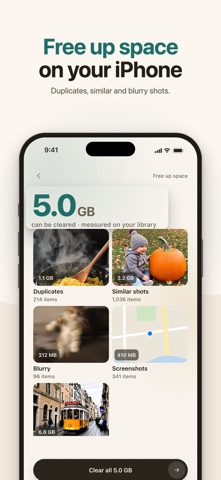
Free up space on your iPhone without worrying about losing a photo. Backspace finds duplicates, similar shots, screenshots, blurry photos and large videos, and nothing is deleted until you say so. Everything you pick goes to a basket first. Changed your mind? Put it back with a tap. After you confirm, iOS keeps deleted items in Recently Deleted for 30 days, so you can still restore them there. See what you get back • Duplicates, similar shots and bursts are grouped together, and each group says why its shots belong together. • Screenshots, blurry photos and large videos each get their own list. • Space is measured on your own library before you clear anything. • If your library uses Optimize iPhone Storage, Backspace shows how much space returns to this iPhone and how much only in iCloud. You pick what goes • In every group, one shot stays. Backspace suggests which one to keep; tap another shot to keep it instead. • Favorites and photos in shared albums are never picked for the basket by default. Change that in Settings only if you want to. • Review the basket before deleting: everything in it is still on your phone. Shrink videos, keep the moments Compress large videos into smaller copies that keep their sound, original date and place. Favorites (while Never select favorites is on, as it is by default) and videos in shared albums are left alone. The original moves to Recently Deleted, so it is still there for 30 days. A few minutes a day • Daily pick: a short deck of the shots that weigh the most, with a running total of the space you’ve freed. • On this day: photos and videos taken on today’s date in earlier years. Swipe to keep or send to the basket, and tap Undo to take a swipe back. Water out of the speaker Got your phone wet? A low 165 Hz tone plays for 30 seconds to help push water out of the speaker. It’s free and doesn’t need access to your photos. More tools • Receipts and documents: finds photos of receipts, documents and screens (iOS 18 or later). • Lighter old photos: JPEG photos become smaller HEIC copies with the same date, place and favorite status; the original goes to Recently Deleted. • Contacts: merges duplicates and finds incomplete or empty cards. A .vcf backup is free. • Spam calendars: removes phishing subscriptions like “Your iPhone is infected”, or shows how. Free. • Private vault: photos, videos and contacts behind Face ID, kept in Backspace and out of Photos and iCloud Photos. Deleting the app deletes the vault. • Phone check of speakers, microphone, screen, sensors, Face ID and vibration with a PDF report, plus a speed test, speaker dust cleaning, a free-space widget, Live Activity and Shortcuts actions. Your photos stay on your iPhone Every scan, comparison and compression runs on the device. Backspace has no account, no ads and no tracking, and it never uploads your photos or videos. Subscription Without a subscription you can scan your library, review everything found, use Daily pick and On this day, delete what’s in the basket and clear water from the speaker. Adding whole groups and categories to the basket at once and compressing videos require a Backspace subscription. Prices, the billing period and any trial are shown in the app before you confirm. Also free: the phone check, speed test, contacts backup, removing spam calendars, and opening the vault and restoring from it. The subscription also covers HEIC conversion, merging and deleting contacts, more than 5 items in the vault and the PDF export. Payment is charged to your Apple Account at confirmation of purchase. A subscription renews automatically unless it is canceled at least 24 hours before the end of the current period; your account is charged for renewal within 24 hours before the period ends. You can manage or cancel your subscription anytime in Settings > [your name] > Subscriptions. Terms of Use: https://great-apps-s.github.io/backspace/terms Privacy Policy: https://great-apps-s.github.io/backspace/privacy
Details