

Min: Time Blocking Planner
IndieWay · Productivity
Independent analytics for this App Store listing. AppTracker is not affiliated with IndieWay.
Chart standing · US
Screenshots



About
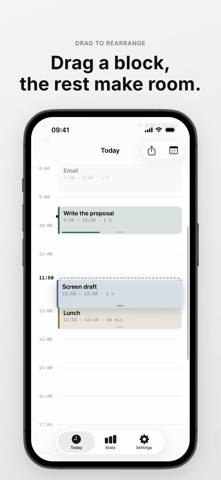
Min lays out your day in time blocks. In the morning, place what you'll do and for how long. During the day, Min shows just one thing: what's now, and how many minutes are left. When something runs long, push everything after it back in one tap. - Three things per block A name, a start, and a length. Min suggests the next free spot, so placing a block takes seconds. Recent names come back with their usual length. - Drag to rearrange Your day is drawn to scale. Touch and hold a block to drag it, and the other blocks preview where they will land as they make room. Drag the bottom edge to change its length. Moved the wrong one? One tap undoes it. - Running late? Push it back Tap Running late and pick 10, 15, 30, or 60 minutes. The current block gets longer and later blocks move only if they overlap, so free time absorbs the delay first. Finished early? End the block and start the next one now. - Now and minutes left The Today screen leads with what's now and the minutes left, then the rest of your day. Free time shows up as gaps you can tap to fill. - Yesterday, today, tomorrow Step through days with the arrows on Today. Plan tomorrow the evening before, and look back at or fix past days. - Stats See where this week's planned hours went, day by day and by what you planned most. - Templates Save a day you repeat, like weekdays or weekends, and add it to an empty day in one tap. Pick weekdays to have it suggested on those days. - Notifications and widgets Get a notification when a block starts, a few minutes before, or when it ends, plus an optional morning nudge on empty days. See what's now and the time left on your Home Screen and Lock Screen. - Yours, on this device No account, no ads, no AI. Your plans stay on your device and in your device backup. Export them to a file and import them back anytime. - Min Pro Planning today and tomorrow, dragging blocks, pushing back, finishing early, one template, notifications, the small and Lock Screen widgets, past days, this week's stats, and export and import are free, with no limit on blocks. Min Pro (optional purchase: monthly, yearly, or one-time lifetime) adds planning up to 2 weeks ahead, unlimited templates, eight block colors, the medium and large day strip widgets, and stats for past weeks and months. Future Pro features are included at no extra cost. Terms of Use (EULA): https://www.apple.com/legal/internet-services/itunes/dev/stdeula/ Privacy Policy: https://indieway.xyz/en/apps/min/privacy
Details