

Hey!ko
Ahmed Ouzini · Utilities
Independent analytics for this App Store listing. AppTracker is not affiliated with Ahmed Ouzini.
Chart standing · US
Screenshots

About
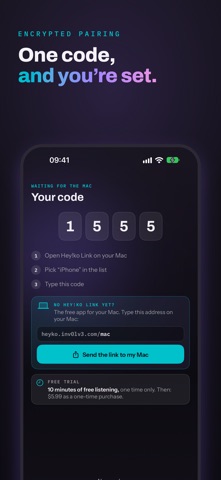
Hey!ko turns your iPhone into a speaker for your Mac, over your Wi-Fi. Whatever your Mac plays (music, video, games, calls) comes out of your iPhone, or the headphones connected to it. Even when it's locked, in your pocket. THREE STEPS TO START 1. Install Hey!ko Link on your Mac (free, at heyko.inv0lv3.com/mac): a small app that lives in the menu bar. 2. Open Hey!ko on your iPhone: a 4-digit code appears. Pick your iPhone in the Mac's list, and type that code. 3. Listen. WHAT IT DOES • All of your Mac's sound: not just one app, everything your Mac plays. • Only hear the iPhone: one switch mutes the Mac while it sends. It speaks again as soon as you stop. • Lock screen: the sound keeps playing, and a card mutes or stops everything without opening the app. • Video mode: the iPhone keeps its screen on, black to use almost no power, and the sound keeps closer to the picture. • Encrypted link: another device on the Wi-Fi can neither listen in nor pretend to be your iPhone. • Your sound stays home: no server, no account. It goes straight from the Mac to the iPhone, never over the Internet. HONESTLY Wi-Fi isn't a cable. Sound takes about two tenths of a second to travel from the Mac to the iPhone. For music, a podcast or the radio, you won't hear it. For a video, a slight gap between lips and voice can show: video mode reduces it. FREE TO TRY Hey!ko gives you 10 minutes of listening to try it: enough to check it all works at your place. Then a one-time purchase unlocks unlimited listening, for good. No subscription, no ads. WHAT YOU NEED • An iPhone with iOS 26 or later. • A Mac with macOS 14.4 (Sonoma) or later, with Hey!ko Link. • Both devices on the same Wi-Fi. A "guest" network often keeps devices apart. PRIVACY The sound is played, then gone: it's never written anywhere and never goes over the Internet. No ads, no usage analytics, no data sold.
Details