

CleanStorage – Swipe & Clean
Sawir Studio LLC · Utilities
Independent analytics for this App Store listing. AppTracker is not affiliated with Sawir Studio LLC.
Chart standing · US
Screenshots




About
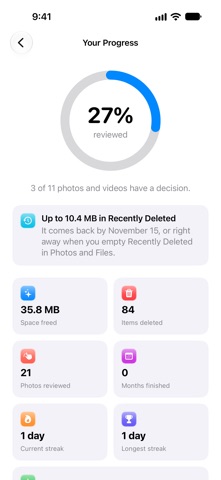
CleanStorage helps you find what takes up space on your iPhone and decide what to keep. No ads, no subscription, and no daily limits. PHOTOS • Duplicates and similar shots, grouped, with the best one suggested to keep • Screenshots, screen recordings, large videos and Live Photos, each in their own list • See how much space each group frees before you delete anything • With iCloud Photos, see what's freed on your iPhone and in iCloud, and get a clear note that deleting removes photos from all your devices SWIPE REVIEW Swipe right to keep, left to mark for deletion, and up to add a photo to Favorites or an album. Videos play right on the card. Go month by month, or choose Largest First to free the most space per swipe, Screenshots, Videos, On This Day, or a daily Random mix. Undo any swipe, and pick up where you left off. Nothing is deleted until you confirm, and deleted photos stay in Recently Deleted for 30 days. SEE WHAT YOU'VE FREED Every cleanup ends with how much space you got back and when it returns to your iPhone. Track your lifetime total, how much of your library you've reviewed, and your daily streak. DUPLICATE CONTACTS Finds contacts that share a phone number, email or name. Choose which contact to keep, leave any contact out, then merge. LARGE FILES Choose a folder, such as On My iPhone or iCloud Drive, and see the biggest files inside it, including in subfolders. Preview them with Quick Look and delete the ones you don't need. GENTLE REMINDERS Optional notifications for low storage, newly found items, a monthly Swipe Review, and photos waiting to delete. They start quietly in Notification Center, and you can turn each one off. WIDGETS AND APPLE WATCH Home Screen and Lock Screen widgets show free space and what's waiting for review. On Apple Watch, check your iPhone's storage and swipe through photos from your wrist, then delete them on your iPhone. FREE AND PRO Scanning, Swipe Review, Screenshots, Large Files and the storage widget are free. CleanStorage Pro is a one-time purchase, with no subscription, and it's shared with your family. It adds one-tap cleanup of duplicates and similar shots, contact merging, Apple Watch, widget shortcuts, checking iCloud-only photos, and rescanning while charging. PRIVATE BY DESIGN Scanning happens on your device. CleanStorage has no account, no ads and no tracking, and it doesn't collect your photos, contacts or files.
Details