

Tap Here: Phone Help with AI
TsuzuKit · Utilities
Independent analytics for this App Store listing. AppTracker is not affiliated with TsuzuKit.
Chart standing · US
Screenshots




About
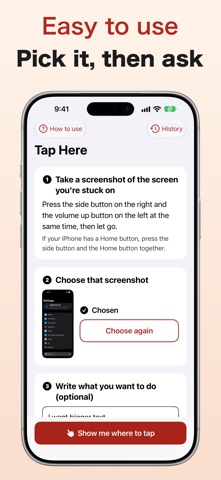
"Where do I tap next?" When you get stuck on your phone, just show a screenshot of that screen. Tap Here marks the place to tap with a red circle, a number, and an arrow. Ask before you tap. No more trying to explain "the gear icon at the top right…" over the phone. HOW IT WORKS 1. Take a screenshot of the screen you are stuck on 2. Choose that screenshot in this app 3. Tap where the red circle is You can also write what you want to do, such as "I want bigger text", for more detailed steps. ONE STEP AT A TIME, READ ALOUD - Steps are shown one by one. Tap "Next" to see the next place to tap - Each step is read aloud (you can turn this off) - Tap the screenshot to zoom in CONTINUE ON THE NEXT SCREEN When the screen changes, show a screenshot of the new screen. The app remembers what you want to do and continues from there. CAUTION ON SUSPICIOUS SCREENS Screens that ask for money or a PIN, or fake virus warnings, are marked with a "Caution" note. If you are not sure, ask your family before you tap. SEND TO FAMILY Send the picture with the circles to your family in a messaging app and talk it through together. LOOK BACK AT PAST GUIDES Guides are saved on your phone, and you can add memos. EASY TO START A short welcome guide lets you practice taking a screenshot and tapping the red circle. EASY TO SEE AND TAP - Large text, strong contrast, and big buttons - Follows your phone's text size setting PRICE A plan is needed to use the app. - Yearly plan: JPY 7,800 (the first 7 days are free) - Monthly plan: JPY 980 - You can ask up to 100 times a day - Plans renew automatically unless canceled at least 24 hours before the end of the current period - Cancel anytime in Settings > your name > Subscriptions - If you cancel during the free trial, you will not be charged - Family Sharing is not supported Terms of Use: https://kokoboshi-jp.web.app/terms Privacy Policy: https://kokoboshi-jp.web.app/privacy PRIVACY Screenshots are sent to AI (Claude by Anthropic) only to work out where to tap, and are not stored on our server. Please do not show screens with a PIN, a password, or a card number. Your saved guides stay only on your phone. Note: The AI can make mistakes. If something seems wrong, stop and ask your family before you tap.
Details