

Hitome Calendar
Shinnosuke Sakihara · Productivity
Independent analytics for this App Store listing. AppTracker is not affiliated with Shinnosuke Sakihara.
Chart standing · US
Screenshots


About
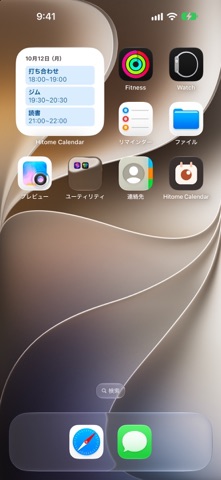
Hitome Calendar is a simple iPhone calendar that lets you take in your schedule at a glance. It keeps only the information and actions you really use every day. - Syncs with Google Calendar Add your Google account in the iPhone Settings app, and you can view, create and edit your Google Calendar events. No sign-in required. iCloud and On My iPhone calendars are supported too. - Clean month, week and day views - In month view, tap a date to see that day's events below - Events are shown as bands in their calendar's color, so you can tell them apart without reading - Swipe left or right to move between periods - Simple event editing and alerts - Just title, date and time, repeat, alert and notes - Repeat daily, weekly, monthly or yearly - Tap an alert to open the event's details - Premium (free for 1 month) - See today's events in a Home Screen widget - See your next event on the Lock Screen - Share your free time as text in a message - See the time left for an event on the Lock Screen and in the Dynamic Island (iOS 26 or later) - About Premium subscriptions - Premium is an auto-renewable subscription, billed monthly or yearly - New subscribers get a 1-month free trial (once per Apple ID) - Payment is charged to your Apple ID at confirmation of purchase - The subscription renews automatically unless canceled at least 24 hours before the end of the current period - Your account is charged for renewal within 24 hours before the end of the current period - You can cancel from Settings > Manage Subscription in the app, or from your Apple ID in the iPhone Settings app - Privacy Your event details never leave the app. You can turn off sending usage and crash data at any time in the app's Settings. Terms of Use: https://hitome-calendar.ssakihara.com/en/terms Privacy Policy: https://hitome-calendar.ssakihara.com/en/privacy
Details