

Stage Plot Flow
James Roche · Music
Independent analytics for this App Store listing. AppTracker is not affiliated with James Roche.
Chart standing · US
Screenshots





About
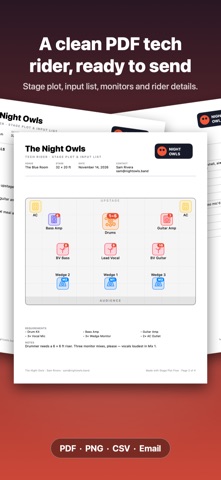
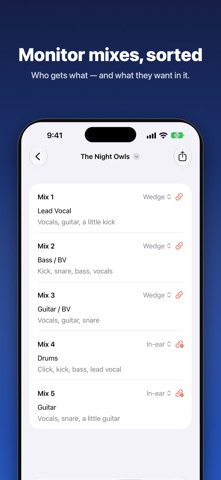
Every band has to send venues a stage plot and tech rider. Stage Plot Flow turns that chore into a few minutes of work — and the result looks professional. PLOT YOUR STAGE • Drag drums, amps, keys, mics, monitors and power onto your stage. Add your own gear too. • Channel numbers appear right on the plot, matched to your input list. • Undo and redo, multi-select, snap to grid, resize and rotate. • Set the stage size in feet or metres and choose which side the audience is on. BUILD YOUR INPUT LIST • Mic or DI, stand type, 48V and bring-your-own for every channel. • Auto-fill channels from the gear on your stage. • Save your list as a preset and reuse it at the next gig. SORT YOUR MONITORS • Say who gets which wedge or in-ear mix and what they want in it. SEND A RIDER VENUES LOVE • One tap makes a clean, multi-page PDF: stage plot, input list, monitor mixes and a rider page for load-in, soundcheck, set length, power, backline and hospitality. • Light or dark, with your band logo. Stage-only one-pager if you prefer. • Email it straight to the venue, or export a PNG of the stage and a CSV of the input list. BUILT FOR REAL GIGS • Templates for rock band, acoustic duo, singer-songwriter, jazz trio, brass band, worship band and DJ set. • Duplicate a plot for the next show with a new venue and date. • Share a plot with a bandmate by AirDrop. • Works on iPhone and iPad, in English, Spanish, German and French. No account. No ads. No tracking. Your plots stay on your device.
Details