

Remo - One Camera
Abhiraman Bakshi · Photo & Video
Independent analytics for this App Store listing. AppTracker is not affiliated with Abhiraman Bakshi.
Chart standing · US
Screenshots


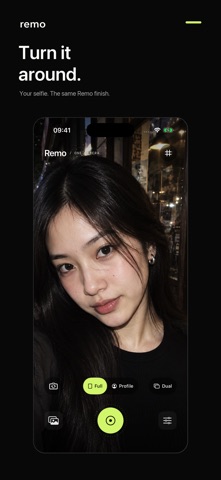


About
See it. Shoot it. Remo turns everyday moments into finished photographs, with two signature looks and no editing session. The whole app is completely free: every look, camera mode, shutter sound, and feature. No purchases, subscriptions, or paywalls. TWO SIGNATURE LOOKS Remo brings editorial color and a gentle film-inspired finish. Ash brings expressive black and white. Swipe the camera preview to change your look, then tap to capture. SELFIES, YOUR WAY Switch to the front camera for Full-view selfies or a circular Profile frame. Compose your profile photo as you shoot, without extra cropping afterward. Both Remo and Ash are available on the front and rear cameras. BOTH SIDES OF THE MOMENT Dual combines a rear-camera photograph with a small circular front-camera inset. Show your view and yourself in one image. Available on iPhones that support simultaneous front and rear capture. A CAMERA THAT FEELS LIKE YOURS Choose from eight shutter sounds. Add a composition grid, adjust zoom, or hold an area of the preview to guide focus and exposure. Tap the live image or use the shutter to shoot. Custom shutter sounds depend on iOS support and respect Silent mode. OPTIONAL SMOOTHER PHOTOS Choose lower ISO with the optional Smoother Photos setting. Longer exposures can blur moving subjects, so this setting is off by default. YOUR PHOTOS, READY TO SHARE Browse your saved photographs, swipe between images, and hold to compare with the original. Select multiple photos or select all to share or delete. Photo information shows the look used, and shared files have clear names. Allow Photos access to save finished captures automatically to Apple Photos. QUICK WAYS TO START Add widgets for your favorite camera modes. On compatible iPhones, use Camera Control to launch Remo, shoot, and adjust zoom. Supported Lock Screen camera access helps you capture a moment quickly. Features vary by device and iOS version. A SHORT TOUR, THEN YOU ARE READY Updated onboarding introduces Remo. A quick tour shows how to swipe for Ash, use Profile framing, and capture with Dual. Replay it anytime in Settings. FREE, PRIVATE, AND SIMPLE No account, advertising, or third-party tracking. Your photographs are developed and stored on your iPhone. If you enjoy Remo, you can rate the app and support the developer from Settings. Capture resolution and RAW availability depend on your iPhone, camera mode, zoom, and lighting. Dual uses a rear still photograph with a front-camera video-frame inset.
What's new · 1.1
Meet the new Remo. Every feature is completely free, with no purchases or subscriptions. • Two signature looks: Remo editorial color and Ash black and white. Swipe the camera preview to switch. • Front-camera selfies in Full view or a circular Profile frame, ready to share without extra cropping. • Dual capture combines your rear-camera photo with a circular selfie inset on supported iPhones. • Eight selectable shutter sounds. • Select multiple photos—or select all—to share or delete from your library. • Accurate photo information, including the look used, and clear filenames when sharing or AirDropping. • Optional Smoother Photos lowers ISO; longer exposures may blur moving subjects. • Updated onboarding and a short tour of Ash, Profile, and Dual. Replay the tour from Settings. • Widgets for quick access to your camera modes. • Camera Control launch, capture, and zoom on compatible iPhones, plus supported Lock Screen camera access. • A gentle rating request and “Rate the app and support the developer” in Settings. Your photographs are developed on your iPhone. No account, ads, or third-party tracking.
Details