

DipaDate
Yang Zhang · Utilities
Independent analytics for this App Store listing. AppTracker is not affiliated with Yang Zhang.
Chart standing · US
Screenshots



About
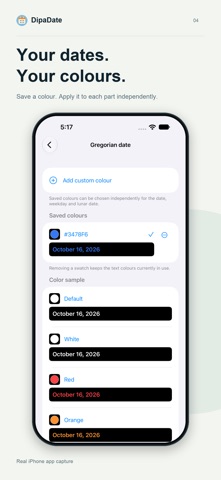
See Gregorian dates, weekdays and Chinese lunar dates in the languages you choose, right on Apple Watch. Choose each date component’s language and colour independently. Supported languages are Simplified and Traditional Chinese, Japanese, Korean, English, Spanish, German, Italian and Russian. Language changes the words; the lunar date continues to use the Chinese lunisolar calendar. Use system colour presets, or save custom colours with the colour picker or a hexadecimal value. Your saved palette is shared across all three date components, with separate selections for each. Preview date layouts on iPhone. Compatible Watch faces support circular, corner, inline and rectangular complications. Choose Gregorian-first or lunar-first for each slot; rectangular complications and Smart Stack show both calendars. A separate Chinese-digit clock requires watchOS 11 or later. Dates use each device’s local time zone. Preferences stay on your devices and sync to your paired Watch through Apple WatchConnectivity. No account is required. The iPhone interface follows your system or per-app language. Requires iOS 17 or later and watchOS 10 or later. Install the companion Watch app first. Available slots, tinting and actual refresh timing depend on the watch face and watchOS.
Details