

KongType: Cantonese Keyboard
Vincent Lui · Productivity
Independent analytics for this App Store listing. AppTracker is not affiliated with Vincent Lui.
Chart standing · US
What changed · US
Listing changes AppTracker has observed for this app in this storefront — new versions, price moves, rating shifts, and store copy.
• Code Kitchen adds lifetime serving milestones at 10, 100, 500, 1,000 and 5,000 dishes, with optional Game Center progress. • Switch between Last 7 Days and All-Time rankings for Quick and Cangjie. • Game Center achievements now include English, Traditional Chinese and Simplified Chinese names and descriptions. • Enable the quick theme-switch icon in Settings; photo themes are skipped when cycling. • Improved Stroke keyboard height and the home-screen Upgrade Pro button. • Pro adds Japanese and Korean input and more keyboard designs.
Screenshots




About
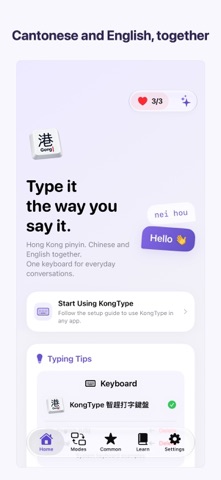
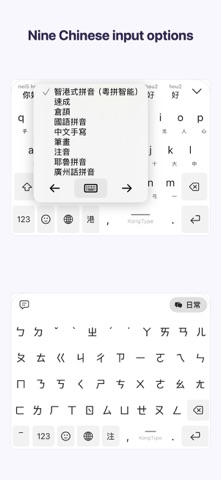
A Cantonese keyboard with free offline Cangjie and Quick dictionaries. Look up characters and radicals, practise with learning games, and type Chinese and English together. FEATURES AT A GLANCE • Nine free Chinese input methods: Cantonese, Mandarin Pinyin, Zhuyin, Quick, Cangjie, Stroke, handwriting, Yale and Guangzhou Cantonese • Offline Cangjie and Quick dictionaries: search characters, codes and radicals, or look up characters by code • Chinese swipe typing: glide across letters and choose Cantonese, Mandarin Pinyin, Cangjie or Quick candidates • Write directly over the keyboard, or choose a separate handwriting area • Cangjie and Quick learning games: Radical Match, Code Challenge and 3D Code Kitchen • Traditional/Simplified output, Hong Kong/Taiwan variants, mixed Chinese/English and English-to-Chinese suggestions • Pro: Japanese and Korean input, photo backgrounds, photo showcase, animated cats and dogs, Hong Kong themes, key sounds and haptics CANTONESE, YOUR WAY Type "nei duck ng duck han" for "你得唔得閒". Mix Chinese and English, with Jyutping, Hong Kong spellings and custom words. NINE FREE CHINESE INPUT METHODS Choose Cantonese, Mandarin Pinyin, Zhuyin, Quick, Cangjie, Stroke, handwriting, Yale or Guangzhou Cantonese. Zhuyin supports tone keys and tone-free lookup. Quick offers KongType and Microsoft Traditional Quick dictionaries. Enable extra methods in settings. SWIPE OR WRITE Choose swipe typing in gesture settings, trace syllables or radical codes and select a candidate. English swiping is also available. Zhuyin and Stroke do not support swiping. Choose handwriting to write over letter keys or in a separate area. Inline handwriting and swiping are alternative gesture modes. FREE OFFLINE DICTIONARIES Search characters or letter codes in the Dictionary tab for Cangjie/Quick codes and radicals. Works offline; Pro expands local history. LEARN THROUGH PLAY Practise Cangjie and Quick with Radical Match, Code Challenge and 3D Code Kitchen in the Learning tab. Each round uses one heart. Hearts refill over time; Pro offers a higher capacity and faster refill. Optional extra hearts are available through in-app purchase. Code Kitchen supports optional Game Center Quick and Cangjie leaderboards with Last 7 Days and All-Time views, plus 10 achievements including lifetime milestones at 10, 100, 500, 1,000 and 5,000 dishes. TRANSLATION AND SAVED TEXT English-to-Chinese suggestions use Apple's Translation framework on supported OS versions after preparing language resources. The initial download needs internet. Everyday/work modes support custom words. Saved phrases and clipboard items allow two entries per category for free, or 30 with Pro. PERSONALISE WITH PRO Use your photos as backgrounds or in a showcase above the keys. Adjust crop, blur and key sizes. Explore 88 styles: three free and 85 Pro. Designs include animated cats and dogs, mahjong, buses, Hong Kong roads, railway signs, retro tiles, weather, ocean, festive and light effects. Adjust mechanical key sounds and haptics. LOCAL INPUT, NO APP ACCOUNT Basic input, words and photos stay on device. Typed text and photos are not sent to developer servers. Allow Full Access shares app settings/photos with the keyboard and enables sound/haptics. Weather and purchases need internet. If you sign into optional Game Center, scores and achievement progress are sent to Apple. Heart-refill notifications are opt-in. SETUP Add KongType in Settings > General > Keyboard > Keyboards > Add New Keyboard. Switch with the globe key. PURCHASES Weekly, monthly and annual Pro subscriptions renew automatically and can be managed or cancelled in Apple account subscription settings. Lifetime is a one-time purchase. Plans and prices depend on region and eligibility. Input and dictionary lookup are free. Support: info@appricolt.com Privacy: https://appricolt.com/kongtype-app-privacy-policy/ Terms: https://appricolt.com/kongtype-eula/
What's new · 1.4
• Code Kitchen adds lifetime serving milestones at 10, 100, 500, 1,000 and 5,000 dishes, with optional Game Center progress. • Switch between Last 7 Days and All-Time rankings for Quick and Cangjie. • Game Center achievements now include English, Traditional Chinese and Simplified Chinese names and descriptions. • Enable the quick theme-switch icon in Settings; photo themes are skipped when cycling. • Improved Stroke keyboard height and the home-screen Upgrade Pro button. • Pro adds Japanese and Korean input and more keyboard designs.
Details