

Sensor Canvas
Sami Kuribara · Health & Fitness
Independent analytics for this App Store listing. AppTracker is not affiliated with Sami Kuribara.
Chart standing · US
What changed · US
Listing changes AppTracker has observed for this app in this storefront — new versions, price moves, rating shifts, and store copy.
• Fixed items jittering while dragging them in freeform placement
Screenshots


About
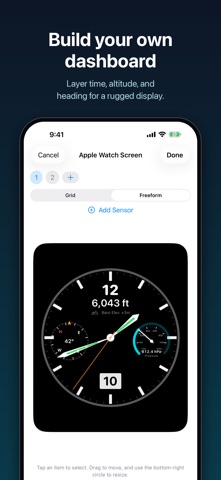
Turn your Apple Watch and iPhone sensors into your own custom instrument panel. Select and arrange only the information you want to see: such as altitude, air pressure, heart rate, compass, pace, and distance: to create the perfect dashboard for your activity. ■ Freely Arrange & Overlay - Place elevation over an analog clock, flanked by a compass and barometer. Overlay instruments in any position and size to create a rugged watch face. - Quickly align metrics using a grid, or create completely separate layouts for your Apple Watch and iPhone. ■ Numbers, Gauges & Graphs - Display any metric as a simple number, a beautiful analog gauge, or a trend graph. - View a 3-hour trend for barometric pressure and altitude to spot weather changes or check your climbing pace at a glance. ■ Essential Metrics for the Mountains - Barometric altitude (you can calibrate using elevation markers), total ascent/descent, vertical speed, and max altitude. - Time to sunset, plus a direction and distance back to start (works completely offline). ■ Gallery - Instantly use pre-designed watch faces and instrument panels. - Share your layout via a link, or publish it to the gallery for others to use. ■ Use on Apple Watch or Just iPhone Screens created on your iPhone automatically sync to your Apple Watch. On Apple Watch Ultra, start instantly with the Action Button, and save your session as a Workout in the Health app when finished. Even without an Apple Watch, you can mount your iPhone to your bike handlebars and track your ride. Tracking continues even when the screen is locked. ■ Battery Friendly Choose from 3 battery life settings: Precise, Standard, and Long-lasting. Automatically switches to Long-lasting mode when the battery gets low. ■ Units Automatically switches based on your region. You can also change this manually in settings. ■ Privacy Measurement data (like location and heart rate) is processed entirely on your device and is never sent externally. No ads and no tracking. ■ Sensor Canvas Premium (Auto-renewable subscription) Basic features are free. With Premium, you can use unlimited layouts, free positioning, and trend graphs. Monthly and annual plans are available, both with a 7-day free trial. Payment will be charged to your Apple ID at confirmation of purchase, and the subscription will automatically renew unless canceled at least 24 hours before the end of the current period. You can cancel anytime in your App Store account settings. Terms of Use (EULA): https://www.apple.com/legal/internet-services/itunes/dev/stdeula/ Privacy Policy: https://explorerslab-inc.com/sensorcanvas/#privacy
What's new · 1.2.1
• Fixed items jittering while dragging them in freeform placement
Details