

Sift and Pare: Swipe to sort
George Sabourin · Photo & Video
Independent analytics for this App Store listing. AppTracker is not affiliated with George Sabourin.
Chart standing · US
Screenshots




Similar apps
Competitors and close alternatives, as estimated by AppTracker.


About
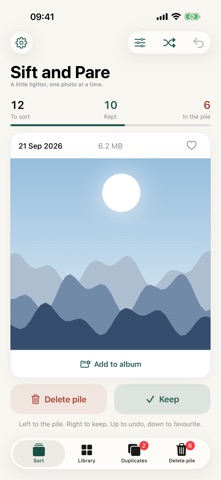
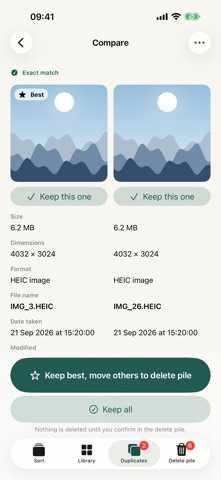
Sort your photo library in minutes, one swipe at a time. Sift and Pare turns a cluttered Photos library into something you'll enjoy going through. Photos appear one at a time and all you need to do is swipe to decide, and the app remembers. Pay once, swipe forever No pesky subscriptions Swipe to sort • Swipe left to send a photo to your delete pile • Swipe right to keep it • Swipe down to make it a favourite (syncs to the photos app) • Swipe up to undo your last decision • Press add to album to add to any of your albums from the Photos app, or make a new one! Nothing is deleted until you review the pile and confirm. If you change your mind, restore anything with a tap. Plus, deleted photos remain in the ‘recently deleted’ folder for up to 40 days before deleting permanently. Find what you're looking for • Filter by photos, videos, photos with people in, blurry or accidental photos, and more • Sort by newest first, oldest first, largest file size first, or smallest file size first • Browse the whole library in a grid, by day, month or year. • Browse through your existing folders from the Photos app • Jump to any date with the calendar, or see a day "every year" to relive past years • Sort by a person, a place or a trip, using the people and location data Photos already holds • Select several photos at once to keep them, add them to an album or send them to the delete pile Clear out duplicates Exact duplicates are found automatically and flagged on the Duplicates tab. Scan for similar shots, such as bursts and near-identical frames, whenever you like, then keep the best and bin the rest. See what you'll free up Your delete pile shows how much space you'll get back before you commit. Your decisions, on all your devices Turn on iCloud sync and your keep and delete decisions follow you between iPhone, iPad and Mac, so you never sort the same photo twice. Made for every screen • iPhone, iPad and Mac, including iPhone Duo • Light and dark appearance • Supports Dynamic Type for larger text, plus VoiceOver Private by design Your photos stay in your Photos library. Finding duplicates and faces happens on your device, and nothing is uploaded to a server. iCloud sync, if you turn it on, stores only your decisions in your own private iCloud. We can never see your photos or your decisions. Start now Start with last week, or tackle ten years of photos. A few minutes a day adds up.
Details