

FlyGlyph: Sky Art for Pilots
Lenny Tropiano · Navigation
Independent analytics for this App Store listing. AppTracker is not affiliated with Lenny Tropiano.
Chart standing · US
Screenshots



About
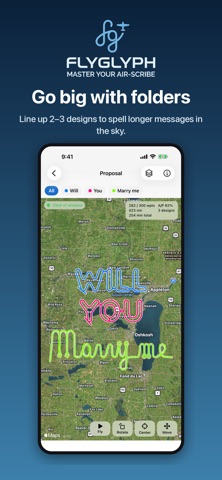
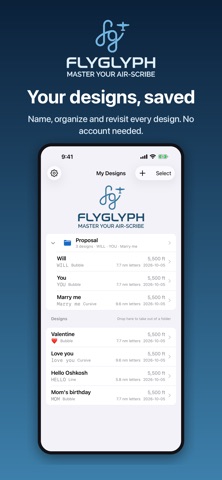
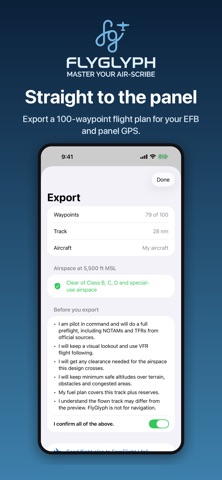
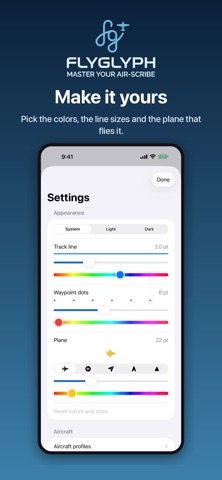
FlyGlyph turns a word, a name or a heart into a flight plan your autopilot can fly, or you can hand fly. On FlightAware and Flightradar24, your GPS track writes it across the sky for everyone to see. TYPE IT • Bubble, line or cursive lettering • Symbols: 24 shapes in one tap, from a heart, star and crown to an airplane, UFO and lightning bolt • Letters sized for your aircraft: cruise speed, autopilot bank limit and a wind allowance set every turn • Every plan fits in 100 waypoints, the limit of most modern GA panel GPS navigators • No turn sharper than your autopilot can fly, and no overlapping turns KNOW YOUR AIRSPACE • Checks the predicted track at your planned altitude against FAA Class B, C and D airspace and special-use areas: prohibited, restricted, MOAs, warning and alert areas • Alerts by name, like "In KORD Class B" or "Near KGTU Class D", with floors, ceilings and what each one requires • Airspace outlined on the map and listed on every design in My Designs • Updates live as you move, resize, rotate or change altitude • FAA data refreshed every 28-day cycle; FlyGlyph asks before downloading it PLACE IT • Start over your home airport or at your location • Jump to where you are, your home airport or any of 12,000+ US airports in one tap • Drag, pinch and twist on satellite imagery or the FAA VFR sectional • Height and width in nautical miles, track length and flight time PREVIEW IT • Watch a plane fly the whole design at 100× to 1000× before you take off • An A/P score shows how closely an autopilot will follow the shape GO BIG • Line up 2–3 designs in a folder to spell longer messages, each its own flight plan EXPORT IT • Garmin .fpl for ForeFlight and other EFBs, plus GPX, KML and CSV • A pilot-in-command checklist before every export MAKE IT YOURS • Undo and redo, backup and restore, track and plane colors and icons • No account, no ads, no tracking: your designs stay on your device • iPhone, iPad and Apple silicon Mac PRICING Try everything free for 3 days, then unlock it once for $3.99. No subscription. FLY SAFE FlyGlyph is a planning and creative tool, not a navigation source. The airspace check covers the United States and does not include TFRs, NOTAMs or whether part-time airspace is active. Check airspace, TFRs, NOTAMs, terrain and fuel with official sources before every flight. The pilot in command is responsible for the safe conduct of the flight.
What's new · 1.1
• Six new symbols: teddy bear, dolphin, pumpkin, cowboy hat, elephant and turtle, 24 in all • Symbols start on a straight edge, so shapes like the airplane fly cleaner • Folders fly their designs one after another, in the order you choose: drag a design to reorder, or use Move Left / Right and Move Up / Down • Export a whole folder: one flight plan per design, each with its own waypoint names • One Export button with a format menu: Garmin .fpl, GPX, KML, CSV or all four • Each .fpl now clears waypoints left over from a longer earlier plan in ForeFlight and Garmin Pilot • Edit a folder's designs right on the folder map • Delete Folder and Designs, Collapse all and Expand all in My Designs • Settings → Delete Data and Reset to Defaults • Backups restore every setting and aircraft profile exactly • Mac: Done closes Export after sharing
Details