

BrowPane
Tomokazu Shinozaki · Utilities
Independent analytics for this App Store listing. AppTracker is not affiliated with Tomokazu Shinozaki.
Chart standing · US
What changed · US
Listing changes AppTracker has observed for this app in this storefront — new versions, price moves, rating shifts, and store copy.
Updated the App Store description and screenshots, and clarified how ads work when using private tabs. App features and ad placement rules are unchanged.
Screenshots


About
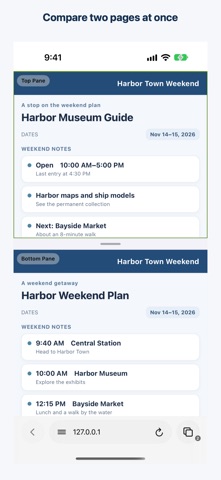
Compare two web pages on one screen and turn repeatable actions into a macro. BrowPane is an iPhone browser with tabs and split view. COMPARE TWO PAGES View pages one above the other and drag to adjust. Compare an itinerary with a venue guide, for example. Open two pages in tabs and choose Enter Split View from the page menu. MAKE A MACRO Try the starter macro under Macros in the page menu: it opens a URL, waits, then takes a screenshot you can save to Files. Add taps, text entry, scrolling, or repeats. Website changes and loading can affect results; check the URL, text, and steps before running. ORGANIZE BROWSING Switch regular and private tabs, reopen recently closed tabs, keep history on your device, search pages, choose Google, Bing, or DuckDuckGo, and download files to a folder in Files. Bookmarks and Reading List save titles and URLs, not offline page content. ADS AND PRIVACY BrowPane blocks some ad requests and hides some page overlays, but ads may remain. A clearly labeled native ad may appear only on regular-tab start pages. There is no persistent banner. If consent and ad setup allow ad requests, BrowPane may load a rewarded ad before showing the choice when you run a macro from either a regular or private tab. If one loads, choose “Watch an Ad to Run Once” or “Cancel.” The ad opens if you choose to watch; the macro runs once only if the reward is earned. Cancel or close before the reward and the macro will not run. If consent or ad setup does not allow a request, or an ad is unavailable, the macro runs without an ad. Private tabs are not added to saved history and use a non-persistent website-data store. They do not hide activity from websites, search engines, or network providers, or automatically remove downloads and macro data. WebKit’s non-persistent data store does not turn off data processing by advertising SDKs. Text recognition runs on your device. Ad-data handling may vary by region and consent; see the Privacy Policy and App Store privacy details. Support: https://reishabu.tokyo/browpane-support/
What's new · 1.0.1
Updated the App Store description and screenshots, and clarified how ads work when using private tabs. App features and ad placement rules are unchanged.
Details