

PDF Medic
Muhammad Jaisal Padayattu Poyil · Productivity
Independent analytics for this App Store listing. AppTracker is not affiliated with Muhammad Jaisal Padayattu Poyil.
Chart standing · US
Screenshots




About
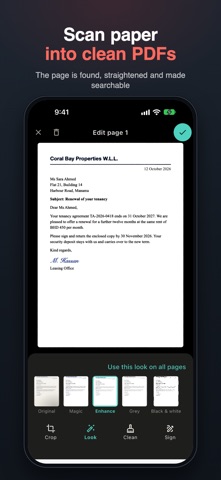
PDF Medic does its work on your iPhone. Your files are never uploaded: every tool — including text recognition and redaction — runs on the phone, works without internet, and needs no account. WHAT MAKES PDF MEDIC DIFFERENT • Private by design: no uploads, no sign-in, every tool works in airplane mode. • Redaction you can trust: card numbers, IBANs and Aadhaar numbers are only flagged when their check digits are valid; you review every page; pages with boxes are rebuilt as pictures, so nothing under a box can be recovered. • Arabic as a first language: a full right-to-left app, Arabic text recognition, search that ignores vowel marks, Arabic in watermarks and on forms. • Honest about your files: the original is never overwritten; owner restrictions are respected; passwords are removed only with the password you type; it warns before a change would break a digital signature. • No subscription: every tool is free; one optional Lifetime purchase removes the small "Made with PDF Medic" mark forever. SMART REDACT • Finds card numbers, IBANs, ID numbers (Aadhaar, PAN, Emirates ID), passport lines, phones, emails, and values after labels such as "CPR No" — in English and Arabic, on scans too • Switch any find on or off, add your own words, or draw boxes SCAN • The page is found, straightened and turned upright; curled book pages are flattened • Looks: Magic, Enhance, Grey, Black & white; a brush to clean marks; sign on the page • Scans are searchable straight away; "Sharp text, smaller file" keeps letters crisp in a much smaller PDF • Business cards to Contacts, receipts to a spreadsheet (CSV), QR codes; tables to CSV on iOS 26 • ID-card layout: front and back on one page READ, FIND AND FIX • Open PDFs inside the app: zoom, select text, find words • Make scanned PDFs searchable, or copy all their text • Find words in any PDF and save a copy with them highlighted • Fix a word: tap it and type — same ink and size, on the page's own background FILL & SIGN • Fill in forms or type anywhere; ticks, dates, your signature (drawn or from a photo) • Pen, highlighter that follows the words, shapes, pictures and white-out WATERMARK • Text, logo or QR code; outline letters; "Page 1 of 9" in the mark • A named copy for each person, with the name also hidden inside the file • Make it hard to remove: the pages become pictures COMPRESS • A slider with a live before-and-after and the size you'll get, or a target such as under 2 MB — it says so if a size can't be reached PHOTOS • Compress a photo, or fit it under a size such as 50 KB • Resize, crop (incl. passport 35×45), turn, and convert JPG/PNG — iPhone HEIC photos too • Exact-size photos for application forms: exact pixels within a KB limit • Signature background remover: a clean signature on a see-through background ORGANIZE AND MORE • Merge, reorder, rotate, split, insert or crop pages; several pages on one sheet • Images to PDF; PDF pages to JPG or PNG • Repair PDFs that won't open; page numbers; passwords (AES-256); flatten forms • Smart file names, e.g. "Invoice – Acme – 4 Oct 2026"; folders and tags; search the words inside your scans; optional Face ID lock • Open any PDF from Files, Mail or WhatsApp straight into PDF Medic • English and Arabic, light and dark mode FREE TO USE Every tool is free. When you save, you can watch one short video to save that file without the small "Made with PDF Medic" mark, or save it with the mark. A one-time Lifetime purchase removes the mark forever — no subscription. Text recognition uses Apple's on-device recognition; the languages it reads depend on your iOS version. Privacy policy: https://dexaloop.com/pdfmedic/privacy Terms of use: https://dexaloop.com/pdfmedic/terms
What's new · 1.1.0
A new look and many new tools — all still on your iPhone, nothing uploaded. • A calmer, cleaner design, with page previews of your files • Open and read PDFs in the app: zoom, select text, find words • Smarter scanning: pages turned upright, curled book pages flattened, a Magic look, a clean-up brush, sign on the page, sharp text in smaller files, scans searchable straight away • Business cards to Contacts, receipts to a spreadsheet (CSV), QR codes • New Photos tools: compress under a KB limit, resize, crop, convert, exact-size photos for forms, and a clean signature from a photo • Watermark: a named copy for each person, page numbers in the mark, QR codes, outline letters, and a hard-to-remove option • Fill & sign: pictures, white-out, and a highlighter that follows the words • Several pages on one sheet; split into files of any number of pages • Folders and tags, search inside your scans, and an optional Face ID lock • iPhone permission messages now in Arabic too
Details