

UpForReal: Mission Alarm Clock
Kenichi Ando · Utilities
Independent analytics for this App Store listing. AppTracker is not affiliated with Kenichi Ando.
Chart standing · US
Screenshots


About
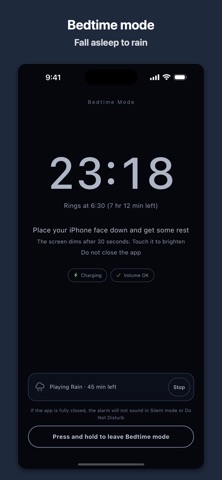
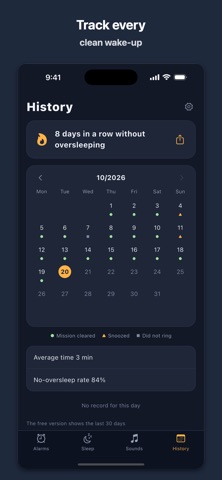
You turn off the alarm and fall right back asleep. This alarm clock is built to end that. An alarm in UpForReal does not stop when you press a button. It keeps ringing until you finish the mission you chose the night before. To silence it you have to sit up, think, and get out of bed. WAKE-UP MISSIONS Photo Before bed, take a photo of a spot away from your bed, such as the bathroom sink or the front door. In the morning, walk there and take the same photo to stop the alarm. Your saved photo stays in the corner of the screen so you know what to aim at. Math Solve addition or multiplication problems. Choose from 1 to 5 problems and three difficulty levels. After three wrong answers in a row the problems get a little easier, so you are never stuck. Squats Hold your iPhone at your chest and do squats, from 5 to 30. Simply waving the phone up and down does not count. Memory (Premium) Watch the tiles on a 3 by 3 grid light up, then tap them in the same order. Shake (Premium) Shake your iPhone the number of times you set. Walk (Premium) Walk the number of steps you set. With Premium you can chain up to three missions on a single alarm. Take the photo, solve the problems, do the squats. By then you are awake. BUILT TO KEEP YOU UP - Snooze has a limit that you set. Once it is used up, it is gone. - Wake-up check. Ten minutes after the missions, the app checks that you are still up. - You can have the volume rise gradually. - On iOS 26 and later, the alarm appears on the Lock Screen and rings even in Silent mode or during a Focus, and even if the app is closed. Stop it there and it rings again until the mission is done, every 10 seconds to 3 minutes, 10 to 50 times. BEFORE BED - Bedtime reminder, worked out from your next alarm and your sleep goal. - Bedtime mode dims the screen and shows only the clock and your next alarm. - Sleep sounds. Rain, white noise and pink noise are free. Waves, campfire and fan come with Premium. A timer stops them automatically. - Volume check, so you do not go to bed with the volume turned down. WAKE-UP HISTORY - A calendar shows the days you got up without oversleeping and the days you snoozed. - A streak counts how many days in a row you got up cleanly. - See how long it took to stop each alarm, which missions you used, and how many tries they took. - Your history stays on your device. Nothing is sent anywhere. ALARM SOUNDS - Bell, digital, siren and chime - Classical pieces, cut to their most energetic 28 seconds. La Campanella and the Turkish March are free. - Premium adds Beethoven's Symphony No. 5, Toccata and Fugue, the Revolutionary Etude, Fantaisie-Impromptu, In the Hall of the Mountain King, the Thunder and Lightning Polka, Fur Elise, the Minute Waltz, Eine kleine Nachtmusik, Maple Leaf Rag, The Entertainer, and drums. - Add your own sounds from a file or another app's share sheet. One in the free version, unlimited with Premium. The first 30 seconds are used. PRICING Free: up to 3 alarms, the math, photo and squat missions, Bedtime mode, the wake-up check, and the last 30 days of history. The free version shows a banner ad at the bottom of the screen. Premium is a one-time in-app purchase that adds: - No ads - Unlimited alarms - The memory, shake and walk missions - Up to three missions per alarm - Every alarm sound and sleep sound, and unlimited sounds of your own - Full history and CSV export Buy it once and keep it. This is not a subscription. GOOD TO KNOW - On iPhones running a version earlier than iOS 26, the alarm will not sound in Silent mode or Do Not Disturb if the app is fully closed. Keep the app open at bedtime and use Bedtime mode. - The app cannot raise your iPhone's volume. Check it with the side buttons before you sleep. - The photo mission needs camera access and the walk mission needs Motion and Fitness access. If you do not allow them, the app switches to another mission. SUPPORT Questions and requests: https://tenmais.jp/contact/
Details