

Pixel Bounce: Bead Art Camera
晓强 江 · Photo & Video
Independent analytics for this App Store listing. AppTracker is not affiliated with 晓强 江.
Chart standing · US
Screenshots




About
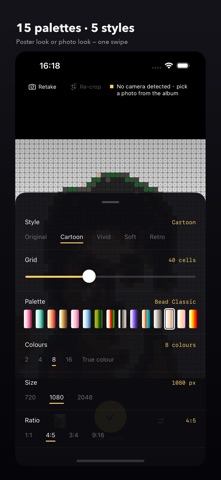
ONE LINE Turn a photo into fuse-bead art: one bead per cell, with the colors, density and style up to you. HOW IT WORKS 1. It opens as a viewfinder. Shoot straight away, or pick one photo from your library — only the photo you tap is handed over; the app never reads your library. 2. Frame it: pinch to zoom, rotate, reset in one tap. 3. Adjust and watch it redraw live: grid from 8 to 96 cells, 2 / 4 / 8 / 16 colors or True color, 15 palettes, 5 styles (Original, Cartoon, Vivid, Soft, Retro). 4. Tap "See result" to inspect the whole piece before you save it to Photos or share it. WHAT YOU CAN DIAL IN · Grid: 8–96 cells. Fewer cells read like a chart, more cells stay close to the photo. · Colors: the steps you can pick follow the palette you chose — the app never offers a color count that palette cannot actually supply. · Palettes: all 15 are free, no Pro gate. Bead Classic carries 22 colors including skin tones and neutral grays; there are macaron, high-saturation, NES, 1-bit newsprint and wabi-gray cards too. · Styles: Original / Cartoon / Vivid / Soft / Retro. · Size and ratio: 720 / 1080 / 2048 px, 1:1 / 4:5 / 3:4 / 9:16. FREE AND PRO Free: three watermark marks on the image, one export per day, 720 px, 1:1. Pro is a one-time purchase, not a subscription: no watermark, unlimited exports, 1080 and 2048 px, and every ratio. Restore purchases from Settings on a new device. PRIVACY Pixel Bounce runs entirely on your device. No account, no server, no analytics, no advertising, no tracking identifier. Photos, exports and settings stay on your phone and disappear when you delete the app. Camera access is used only for the viewfinder; Photo Library access is add-only, so your library is never read. PLEASE NOTE This app produces a preview image — what your bead project would look like, and which colors it would take. It does not generate a per-cell pattern sheet, a numbered legend or a shopping list, so it is not a build guide. Terms of Use: https://www.apple.com/legal/internet-services/itunes/dev/stdeula/
Details