

All Square: Split Expenses
Hamdouchi Interactive, LLC · Finance
Independent analytics for this App Store listing. AppTracker is not affiliated with Hamdouchi Interactive, LLC.
Chart standing · US
What changed · US
Listing changes AppTracker has observed for this app in this storefront — new versions, price moves, rating shifts, and store copy.
Thank you for using All Square. This update is for the bills that never stop coming. Repeating expenses and a monthly summary. 1. Repeat an expense: pick Weekly, Every 2 weeks, Monthly or Yearly on a new expense and All Square adds it again on the day, with the same split. Rent on the 31st lands on the last day of shorter months, as rent does. 2. Every repeat is a normal expense: edit it, delete it, or leave it be. The series itself lives under Repeating Expenses in the group menu, where you can change it, pause it (a month off is a month off, nothing is backfilled) or stop it for good. 3. Monthly Summary, also in the group menu: each month's total, how many expenses, what you paid and your share. Payments are not spending, so they stay out of it. 4. Repeats sync with the rest of your ledger through your own iCloud. Nothing runs in the background and nothing leaves your phone. 5. A fix for a nasty one: when iCloud turned a group away (a full iCloud, for example), the members you had just typed could vanish from your iPhone. They now stay put and sync when iCloud is ready. 6. Swiped to delete a group, then changed your mind? Cancel used to hide it until the next launch, like it was sulking. Now it stays right where it was. 7. Pull down on the groups list to sync with iCloud now and bring in changes from your other devices. Found a bill All Square could split better? Tell us at hamdouchi.com.
Screenshots





About
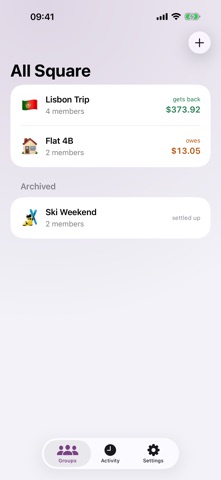
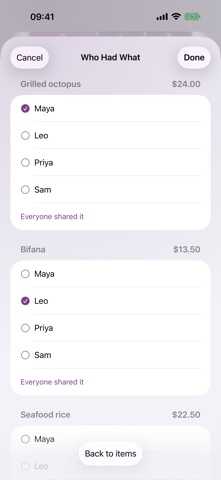
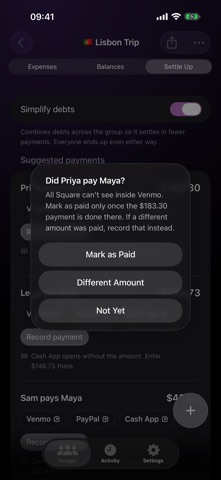
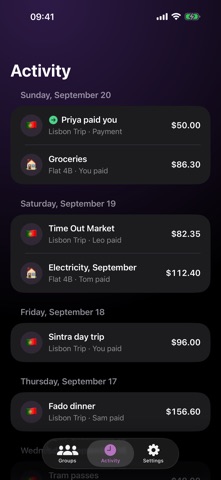
All Square keeps the books for shared costs: a trip with friends, a flat with roommates, a couple's spending or a dinner table. One person keeps the ledger on their iPhone, everyone else gets a clear summary, and nobody needs an account. No ads, no sign-up, no subscription. Your first group is free, with every feature and no limit on expenses. All Square Pro is a one-time purchase for when you want more than one group. GROUPS • Make a group for each trip, home, couple or event, with a name, an emoji and a base currency • Add members by name only, no Contacts access needed, and mark which one is you • See your own balance in every group at a glance, in words: "gets back" or "owes" • Archive finished groups and bring them back any time EVERY SPLIT TYPE • Split equally, leaving anyone out, or by exact amounts, percentages or shares (a couple can count as two) • A bar under the split shows the total cut into everyone's piece as you type • The form tells you live whether the split adds up, names what to fix, and only saves when it does • Every split adds up to the cent: when a cent cannot divide evenly, the app shows who took it and why • Spent in another currency? Type or confirm the exchange rate yourself. The original amount is always kept and shown • Search the history by description or member, edit anything, and undo a delete SCAN A RECEIPT • Scan a receipt with the camera or pick a photo • Text recognition runs on your iPhone and proposes the items, subtotal, tax and tip • Check and fix the items, then tap who had what. Shared items split among the people who shared them • Tax and tip follow each person's items • The photo is never kept, only the items you confirm BALANCES AND SETTLE UP • Everyone's balance in the group's currency, in words as well as color • Simplify debts to see the fewest payments that settle the group, or turn it off to see who owes whom directly • Record a full or partial payment between any two members • Payment links: when someone has a Venmo, PayPal.me or Cash App username, a button opens that app or website with them as the payee and the amount filled in where the link allows it • Back in All Square, you choose Mark as Paid, Different Amount or Not Yet. All Square only records payments: it never moves money and never checks whether a payment went through SHARE AND EXPORT • Share the settle-up summary as plain text, an image or a PDF that lists every expense, so friends on any phone can see it • Export a group as a CSV spreadsheet with every expense and payment ACTIVITY AND WIDGETS • The Activity tab shows the latest expenses and payments from every group, newest first • Home Screen and Lock Screen widgets show your balance in a group, the payments left, your groups, and a one-tap shortcut to add an expense APPLE WATCH • See your groups with your balance in words • Open a group for its balances and suggested payments, and Mark as Paid from your wrist • Quickly add an expense split equally in the group's currency • A watch face complication shows your balance • Your watch stays in step through your own iCloud YOUR DATA STAYS YOURS • Your ledger syncs to your own private iCloud, so a new iPhone or a reinstall brings every group back. No sign-in • The app makes no network calls of its own and collects no data • No ads, no account, no tracking ALL SQUARE PRO • One free group with everything: every split type, receipt scanning, settle up, sharing, widgets and the watch app • Pro unlocks as many groups as you like, with one payment and no subscription • Shared with your family through Family Sharing • Nothing you have entered is ever locked A short introduction shows you around on first launch, and you can see it again from Settings. Venmo, PayPal and Cash App are trademarks of their owners. All Square is not affiliated with them.
What's new · 1.2
Thank you for using All Square. This update is for the bills that never stop coming. Repeating expenses and a monthly summary. 1. Repeat an expense: pick Weekly, Every 2 weeks, Monthly or Yearly on a new expense and All Square adds it again on the day, with the same split. Rent on the 31st lands on the last day of shorter months, as rent does. 2. Every repeat is a normal expense: edit it, delete it, or leave it be. The series itself lives under Repeating Expenses in the group menu, where you can change it, pause it (a month off is a month off, nothing is backfilled) or stop it for good. 3. Monthly Summary, also in the group menu: each month's total, how many expenses, what you paid and your share. Payments are not spending, so they stay out of it. 4. Repeats sync with the rest of your ledger through your own iCloud. Nothing runs in the background and nothing leaves your phone. 5. A fix for a nasty one: when iCloud turned a group away (a full iCloud, for example), the members you had just typed could vanish from your iPhone. They now stay put and sync when iCloud is ready. 6. Swiped to delete a group, then changed your mind? Cancel used to hide it until the next launch, like it was sulking. Now it stays right where it was. 7. Pull down on the groups list to sync with iCloud now and bring in changes from your other devices. Found a bill All Square could split better? Tell us at hamdouchi.com.
Details