

Grenade: Agent Remote
Croissant, Inc. · Developer Tools
Independent analytics for this App Store listing. AppTracker is not affiliated with Croissant, Inc.
Chart standing · US
What changed · US
Listing changes AppTracker has observed for this app in this storefront — new versions, price moves, rating shifts, and store copy.
A simpler session screen, highlights in Command Center, and a canvas that follows your words. • Sessions: a cleaner header with a ⋯ menu for Model, Usage, Show Terminal, Rename and Delete. Tap the session name to switch between the group's sessions, swipe sideways to move to the next one, and slide the terminal up as a drawer when you need it. • A toolbox button opens the session's canvases, plans and terminals full screen, with a dock for Fit, Share, Edit, Design and Build. • Highlights: finished rows in Command Center show the pictures from the work (boards, screenshots, pushes) and open as one page you scroll through, with Share at the bottom. Scroll up in Command Center to load earlier days. • Design from your phone: type "design a pricing page" and a Canvas chip shows which canvas it goes to; a "Design ready" card appears when the agent is done. Type "let's plan this" for a Plan mode chip. • While Claude works, its card shows the step it is on. A finished card says what was done: Pushed, Built, Designed, Planned or Done. • Pushes appear as cards in the activity, with their commits. • Dictation shows a live amber wave in the message field. • Rename a session, and whatever you typed stays in the message box when you switch sessions. • A new G app icon, a simpler lock screen, and many smaller fixes.
In-app purchases · US
No in-app purchases.
Screenshots



About
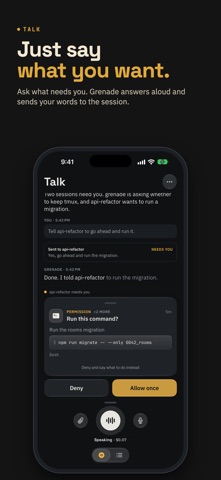
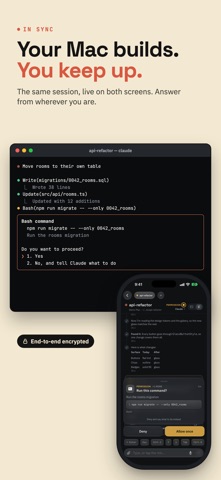
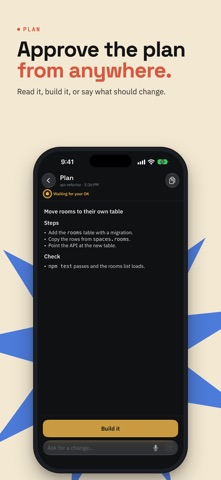
Grenade is a remote for the AI coding agents running on your Mac or Linux computer. Claude Code, Codex or a plain shell run in terminals on that computer; your iPhone shows every one of them with a live status, and lets you read, answer and type from wherever you are. • See at a glance which agent needs an answer, which has finished and which is still working. • Approve a command, answer a question or accept a plan with one tap. The card shows the full command first. • Read the terminal live, or the plain activity view of what the agent said. • Type, paste an image, or hold the mic and talk. • Talk: ask out loud what needs you and hear the answer. Grenade knows your sessions and passes on what you say. It runs on OpenAI or Google Gemini with your own API key, kept on your computer. • Start new sessions in any folder, and group them like tabs. Private by design. On your Wi-Fi the phone talks straight to your computer; anywhere else it goes through a relay that forwards only end-to-end encrypted bytes. No account, no tracking, nothing collected. Needs the free Grenade software on your Mac or Linux computer: brew install holdgrenade/tap/grenade, then grenade setup (Linux: holdgrenade.com/install). No computer handy? Tap "Try a demo" on the first screen.
What's new · 1.0.166
A simpler session screen, highlights in Command Center, and a canvas that follows your words. • Sessions: a cleaner header with a ⋯ menu for Model, Usage, Show Terminal, Rename and Delete. Tap the session name to switch between the group's sessions, swipe sideways to move to the next one, and slide the terminal up as a drawer when you need it. • A toolbox button opens the session's canvases, plans and terminals full screen, with a dock for Fit, Share, Edit, Design and Build. • Highlights: finished rows in Command Center show the pictures from the work (boards, screenshots, pushes) and open as one page you scroll through, with Share at the bottom. Scroll up in Command Center to load earlier days. • Design from your phone: type "design a pricing page" and a Canvas chip shows which canvas it goes to; a "Design ready" card appears when the agent is done. Type "let's plan this" for a Plan mode chip. • While Claude works, its card shows the step it is on. A finished card says what was done: Pushed, Built, Designed, Planned or Done. • Pushes appear as cards in the activity, with their commits. • Dictation shows a live amber wave in the message field. • Rename a session, and whatever you typed stays in the message box when you switch sessions. • A new G app icon, a simpler lock screen, and many smaller fixes.
Details