

Baro: Currency Converter
Jun Kim · Finance
Independent analytics for this App Store listing. AppTracker is not affiliated with Jun Kim.
Chart standing · US
What changed · US
Listing changes AppTracker has observed for this app in this storefront — new versions, price moves, rating shifts, and store copy.
Screenshots


About
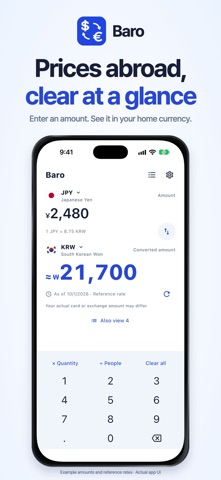
See what prices abroad mean in your own currency with Baro. • A clear conversion result Choose your travel currency and home currency, then enter an amount to see an instant reference conversion. • Multiply quantities and split costs Buying more than one item? Multiply by the quantity. Sharing a cost? Divide by the number of people. The fixed keypad keeps everyday calculations simple. • Compare favorite currencies Choose currencies to view alongside your main result. Open the full list to compare all your favorites. • Calculate with saved rates offline After downloading rates once while connected to the internet, you can calculate with the most recently saved rates without a connection. Baro shows the rate date and saved-rate status, and warns when rates are old. An internet connection is required for the first download. • Make the screen yours Choose from 21 languages, including Simplified and Traditional Chinese, and system, light or dark appearance. Language, appearance and currency preferences are saved on your device. No account is required. Usage sharing is off by default and can be changed in Settings. Entered amounts, calculation results and individual keypad inputs are not sent in analytics events. Rates are daily reference rates provided by Frankfurter, not live trading quotes. Actual payment or exchange amounts may differ because of bank or card fees and exchange conditions. Support: support@ttrufle.com • Widgets & Apple Watch Add a home screen widget. Open Baro on your phone to sync your language, currencies, and saved rates with Apple Watch.
Details