

BEAN MUSE
JUHYEON CHO · Music
Independent analytics for this App Store listing. AppTracker is not affiliated with JUHYEON CHO.
Chart standing · US
What changed · US
Listing changes AppTracker has observed for this app in this storefront — new versions, price moves, rating shifts, and store copy.
- Fixed a rare issue where the app could close when removing the tuner, undoing, switching projects or quitting while the device was very busy.
Screenshots




About
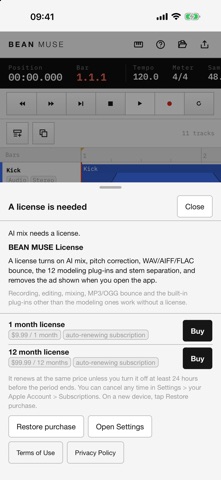
BEAN MUSE is a music studio for recording vocals and instruments, shaping each track, mixing them into one song and exporting the result. Record straight from the iPhone or iPad microphone, or from an audio interface you connect. You can also bring in audio and MIDI files from the Files app and place them on tracks. WAV, AIFF, MP3, M4A, FLAC and OGG all open, and when you add a video file its sound goes onto a track while the picture plays in its own window so you can line things up. Cut, join, move and fade regions, and set the level and position of every track. Draw in volume and pan moves that follow the song. Send several tracks to a shared effect such as a reverb, and group similar tracks to adjust them together. More than 60 effects are built in, including EQ, compressor, reverb, delay, de-esser and limiter. Play MIDI tracks with the built-in synthesizer and fix notes in the piano roll or the notation view. Split a finished song into vocals and backing track, or into instruments such as drums, bass, guitar and piano, each on its own new track. The separation models are downloaded once, the first time you use it. Fix vocal notes that drift slightly with pitch correction. Not sure how to start a mix? Tap AI mix. It analyses each track, decides which effects to use and how to set them, and if you type the feel you want, such as "bring the vocal forward", it mixes in that direction. AI mix needs the AI service you use to be connected in Settings > AI. Audio files are never sent; only the measured numbers and your request are. Export the finished song as MP3 or OGG, keep it in the Files app or send it to another app. Playback and recording keep going when the screen locks or you switch apps. About the license The app works without a license: recording, editing, mixing, MP3 and OGG export, the 50 built-in effects other than the modeling ones, and the synthesizer are all free. Without a license, an ad is shown once when you open the app. A license removes the ad and turns on AI mix, vocal pitch correction, WAV, AIFF and FLAC export, 12 modeling effects based on the sound of vintage studio gear, and stem separation. BEAN MUSE 1 month license — monthly, auto-renewing BEAN MUSE 12 month license — yearly, auto-renewing The price for your country is shown on the purchase screen and in the App Store before you subscribe. It renews at the same price unless you turn it off at least 24 hours before the period ends. You can turn it off any time in Settings > your Apple Account > Subscriptions. Terms of Use: https://www.apple.com/legal/internet-services/itunes/dev/stdeula/ Privacy Policy: https://beanent.com/privacy
What's new · 1.0.6
- Fixed a rare issue where the app could close when removing the tuner, undoing, switching projects or quitting while the device was very busy.
Details