

FTMask - Face & Text Redaction
书培 王 · Photo & Video
Independent analytics for this App Store listing. AppTracker is not affiliated with 书培 王.
Chart standing · US
Screenshots


About
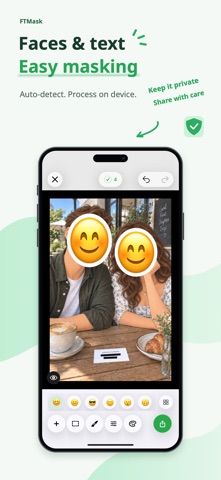
Hide faces and private text before you share. FTMask helps you cover faces in group photos, phone numbers and addresses in screenshots, and license plates in vehicle photos. Combine automatic detection with manual editing, then save or share an edited copy. Detect and review Detect faces, text and license plates, with suggestions for sensitive details such as phone numbers and email addresses. Review each area, adjust it or switch its mask off. Useful for chat screenshots, delivery details and documents. Choose your mask Use solid covers, blur, adjustable pixelation or emoji face covers. Six basic emoji and preset colors are free. Add rectangles or brush strokes, move and resize areas, undo and redo, zoom in and compare with the original. On your device Detection and image processing happen on your device. FTMask does not upload your selected images to developer servers. No account or sign-in is needed for the basic features. Save and share Open an image from Photos or Files, or from a compatible app’s share menu. Export at the original pixel dimensions, save to Photos or share a copy. Designed for iPhone and iPad. Free essentials. Lifetime Pro. Detection, manual editing, solid masks, blur, pixelation and original-resolution exports are free. Free exports include a movable FTMask watermark and retain source EXIF/GPS data, if present. Lifetime Pro is a one-time in-app purchase with no subscription or automatic renewal. Remove the FTMask watermark, choose whether to keep or remove EXIF/GPS data in Settings, and unlock all emoji and custom mask colors. Restore purchases in Settings. Before you export Supports one still JPEG, PNG or HEIC/HEIF image at a time, up to 24 megapixels. Videos and animated images are not supported. Requires iOS/iPadOS 26.0 or later. Automatic detection can miss details. Check the result and add masks as needed. Blur and pixelation do not guarantee protection against inference or recovery. Use an opaque solid cover for important information and inspect the exported image. Privacy Policy: https://hp60.com/ftmask/about/privacy/ Terms of Use: https://hp60.com/ftmask/about/terms/
What's new · 1.0.1
What's New - Added automatic detection and masking of avatars and nicknames in chat screenshots, including conversations and contact lists. - Improved detection and masking of sensitive information on ID cards, passports and other documents, as well as QR codes. - Added options to clear the cache and reset settings. Improved the Restore Purchases experience and the interface.
Details