

Stelo: Focus & App Blocker
Seokyoung You · Productivity
Independent analytics for this App Store listing. AppTracker is not affiliated with Seokyoung You.
Chart standing · US
In-app purchases · US
What this app sells inside itself, grouped by kind and priced for this storefront.
Screenshots



About
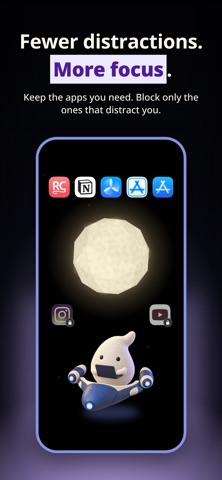
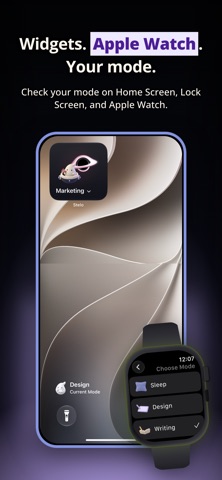
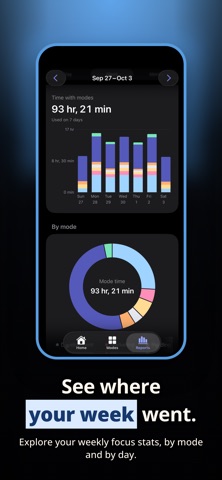
Block distracting apps. Make room for the task in front of you. STELO is an iPhone app blocker with saved setups for each activity. Block social apps while coding, then allow them when it is time to market your work. App blocking that fits the work you do ▶ Block distractions or allow only your tools Block selected social and video apps, or allow only the apps you choose. Save a different approach for each activity. System-required and always-allowed apps remain available. ▶ Switch from coding to marketing The social app you block while coding can become a marketing tool later. Save app lists for Development, Design, Writing, Marketing, and Operations. Restrictions apply to whole apps. ▶ Make each mode your own Rename Writing to Newsletter or Operations to Customer Support. Show the activities you need and put them in your preferred order. Hidden activities keep their saved app selections. ▶ Start and stop on your terms Start a saved mode when ready and switch when your task changes. Return to Default to remove STELO’s restrictions. Editing your setup does not start a mode. ▶ Reflect on your activity rhythm Review daily and weekly mode history and optionally reflect on completed activities. Use those reflections to adjust your setup. Mode duration is not a focus score or per-app usage report. ▶ Reach your modes from your iPhone Open STELO from Home Screen widgets and Control Center to choose a mode. Use native app selection, English or Korean, and optional haptics. ▶ Keep app selections on your device Selected app lists and Screen Time usage reports are not uploaded to a server. Mode history stays on your device and can be deleted in Settings. ▶ Personalize your space companion Start with the included capsule. Pro adds five spaceships and block-screen image styles. Your ship appears on Home and widgets and connects to an alternate app icon. Direct opening from the block screen depends on the supported OS. YOUR APP SETUPS ▶ Block distractions. Make space. An iPhone app setup for the activity ahead. ▶ Different tasks. Different modes. Save separate setups for coding, writing, and marketing. ▶ Keep the tools you need Block selected apps or allow only your selection. GET STARTED 1. Choose an activity. 2. Select and save the apps to block or allow. 3. Start your mode, then return to Default when finished. Requires iOS 18 or later and Screen Time permission. The app supports English and Korean. [Contact & Support] Email: skyu.dev@gmail.com - Terms of Use: https://labs.quartz.best/en-US/stelo/terms-of-use - Privacy Policy: https://labs.quartz.best/en-US/stelo/privacy-policy
Details