

Pocket Stats for Umami
Thomas Bohi · Developer Tools
Independent analytics for this App Store listing. AppTracker is not affiliated with Thomas Bohi.
Chart standing · US
What changed · US
Listing changes AppTracker has observed for this app in this storefront — new versions, price moves, rating shifts, and store copy.
Pocket Stats on your wrist — and widgets you configure. APPLE WATCH • New Apple Watch app, included: your websites, the figure for the period you pick, the curve of the day and who is online, without taking the iPhone out. • It works on its own. The watch reaches your Umami server over Wi-Fi or cellular and signs in again by itself: the iPhone only has to be there the first time. • Your servers and credentials travel straight from the iPhone to the watch over an encrypted link, never through anyone’s server. • Complications for your watch face, in all four shapes: a website’s figure and its trend, or how many visitors are on it right now. Tap one to open the website. • Today, 24 hours, 7 days or 30 days, chosen on the watch and kept there. Several servers, switched from the watch too. WIDGETS • Pick the figure every widget shows: visitors, views, visits, bounce rate, visit duration or views per visit. • Pick what the large widget lists at the bottom: top pages, referrers, countries, browsers, devices, operating systems or events. • New “Ranking” widget: one ranking of one website, with a bar for each row’s share. • New “Live” widget: how many visitors are on your site right now, on the Home Screen or the Lock Screen. • New “Total” widget: every website of an account added up into one figure. • The “Websites” widget gains a small size, 2 to 8 rows and a sort order: as configured, highest first, biggest change or by name. FIXED • On a tinted or clear Home Screen, the change badge showed as an empty white rectangle. • The sign-out confirmation appeared anywhere but next to the account it was about. • Widgets now refresh at a smarter pace through the day.
Screenshots



About
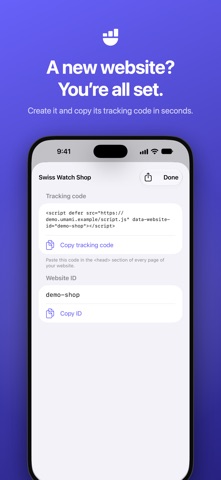
Pocket Stats for Umami is the fast, native way to follow the websites you track with Umami, the privacy-focused open-source web analytics. Sign in to your own self-hosted Umami server or to Umami Cloud, or simply paste a share link, and every website is right there, with today’s line and trend at a glance. YOUR STATS, CLEARLY • Visitors, visits, views, bounce rate and visit duration, compared with the previous period • A traffic chart by hour, day or month, with the previous period as a dashed line: touch and drag to read each bar • Top pages, entry and exit pages, page titles • Referrers, countries, cities and languages • Browsers, operating systems and devices • Custom events • Periods from “Today” to “Last 12 months”, or any custom range REAL TIME • See how many people are on your site right now • Follow the pages they read and where they came from, live ALL YOUR WEBSITES AT A GLANCE • Every website with today’s visitors, a sparkline and its change in green or red • Pin your favorite websites to the top • Sort by name or by visitors MANAGE YOUR WEBSITES • Add a website and get its tracking code, ready to copy • Rename it or change its domain • Reset its statistics or delete it, with a safety confirmation • Administrators can browse every website on their instance ON YOUR WRIST • An Apple Watch app, included in the same purchase • Your websites, the figure for the period you pick, the curve of the day and who is online • It reaches your server on its own, over Wi-Fi or cellular, and signs in again by itself: the iPhone only has to be there the first time • Your servers and credentials travel straight from the iPhone to the watch over an encrypted link • Complications for your watch face, in all four shapes WIDGETS • Widgets inspired by stock tickers: the period’s line, the trend in green or red, visitors online • Five of them: one website, several websites side by side, a ranking, who is live, and every website added up • Pick the figure each one shows, what the large one lists at the bottom, how many rows and in what order • Lock Screen: number and sparkline, gauge against the previous period • Tap the period to switch between today, 7 and 30 days, without opening the app SIRI, SHORTCUTS AND CONTROL CENTER • “How many visitors on my website?”: Siri answers, with a small card • A “Live visitors” control for Control Center, the Lock Screen and the Action button • Touch and hold the app icon to open the realtime view or a recent website MADE FOR IPHONE, IPAD AND APPLE WATCH • Built with SwiftUI: fast, smooth and familiar • Sidebar layout on iPad • Dark Mode, Dynamic Type and VoiceOver • Several accounts and servers in a side panel, switch in one swipe • Share links: follow a website without an account, read-only • In English, French and German PRIVATE BY DESIGN The app talks only to your Umami server or to Umami Cloud. No account with us, no tracking, no ads, no analytics about you. Passwords and API keys stay in your device’s Keychain. TRY IT WITHOUT A SERVER Not using Umami yet? Demo mode shows the whole app with sample websites. Requires Umami v2 or later (self-hosted), an Umami Cloud API key or an Umami share link. Pocket Stats for Umami is an independent app. It is not affiliated with or endorsed by Umami Software, Inc. “Umami” is a trademark of its respective owner.
What's new · 1.3.1
Pocket Stats on your wrist — and widgets you configure. APPLE WATCH • New Apple Watch app, included: your websites, the figure for the period you pick, the curve of the day and who is online, without taking the iPhone out. • It works on its own. The watch reaches your Umami server over Wi-Fi or cellular and signs in again by itself: the iPhone only has to be there the first time. • Your servers and credentials travel straight from the iPhone to the watch over an encrypted link, never through anyone’s server. • Complications for your watch face, in all four shapes: a website’s figure and its trend, or how many visitors are on it right now. Tap one to open the website. • Today, 24 hours, 7 days or 30 days, chosen on the watch and kept there. Several servers, switched from the watch too. WIDGETS • Pick the figure every widget shows: visitors, views, visits, bounce rate, visit duration or views per visit. • Pick what the large widget lists at the bottom: top pages, referrers, countries, browsers, devices, operating systems or events. • New “Ranking” widget: one ranking of one website, with a bar for each row’s share. • New “Live” widget: how many visitors are on your site right now, on the Home Screen or the Lock Screen. • New “Total” widget: every website of an account added up into one figure. • The “Websites” widget gains a small size, 2 to 8 rows and a sort order: as configured, highest first, biggest change or by name. FIXED • On a tinted or clear Home Screen, the change badge showed as an empty white rectangle. • The sign-out confirmation appeared anywhere but next to the account it was about. • Widgets now refresh at a smarter pace through the day.
Details