

Japanese Kana – Kanji
Hamdouchi Interactive, LLC · Education
Independent analytics for this App Store listing. AppTracker is not affiliated with Hamdouchi Interactive, LLC.
Chart standing · US
What changed · US
Listing changes AppTracker has observed for this app in this storefront — new versions, price moves, rating shifts, and store copy.
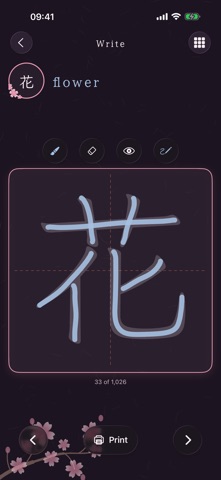
Thanks everyone for downloading Japanese Kanji! In this update, we've added one big new feature: Write, right between Learn and Quiz on the home screen. Write: Now you can practice writing all 1,026 kanji with your finger, one kanji per page, grade by grade. Watch the stroke order draw itself with numbered strokes, trace over a faint textbook-style guide in one of three inks, use the eraser, and hide the guide when you are ready to fly solo. Tap the kanji to hear its readings, use the arrows to step through, or open All Kanji to jump to any kanji in any grade. Prefer pen and paper? Print a practice sheet for any kanji, with its meaning, on'yomi and kun'yomi at the top. Grade 1 is free to write, and Unlock Everything opens grades 2 to 6. A friendly tip: 一 takes one stroke. The others take a few more, so pace yourself. Your feedback helps us improve your experience through ongoing updates. Let us know what you think of this update by writing a review in the App Store. Thank you for your feedback and support.
Screenshots




About
Learn the 1,026 kanji that Japanese children learn in elementary school, grade by grade. Japanese Kana – Kanji is made for beginners: one kanji per flash card with its meaning and readings, sorted into the six school grades, with writing practice and quick quizzes to check what you know. FREE TO START • Grade 1, 80 kanji, is free in Learn, Write and Quiz, with every quiz type and both directions • One purchase, Unlock Everything, adds grades 2 to 6, another 946 kanji. Buy once, keep forever, restore on any of your devices LEARN • All 1,026 kyouiku kanji from the 2020 grade lists of Japan's Ministry of Education: Grade 1 (80), Grade 2 (160), Grade 3 (200), Grade 4 (202), Grade 5 (193) and Grade 6 (191) • Tap a card to turn it over to its English meaning, its on'yomi (in katakana) and its kun'yomi (in hiragana) • Tap the speaker to hear the readings • Tap the check if you knew it or the cross if you did not; missed kanji go to your Practice pile • Switch between All and Practice, shuffle the deck, and see how many you knew at the end of each pass • Your progress in every grade is saved WRITE • Write all 1,026 kanji with your finger, one kanji per page, grade by grade • Watch the stroke order draw itself, stroke by stroke, with a numbered dot where each stroke starts • Trace over a faint textbook-style guide in one of three inks, erase, and hide the guide when you are ready • Tap the kanji to hear its readings, step through with the arrows, or jump to any kanji from All Kanji • Print a practice sheet for any kanji, with its meaning, on'yomi and kun'yomi, for pen and paper practice QUIZ • Sprint: as many right answers as you can in 60 seconds • Survival: keep going until your first mistake • Two directions: read the English and pick the kanji, or read the kanji and pick the meaning • Quiz yourself on every grade at once or on just one • Best scores for every quiz and direction, and a review of your wrong answers after a Sprint EVERY DAY • Kanji of the Day widget for the Home Screen and Lock Screen: tap it to open that kanji's card • An optional daily reminder at the time you choose • Apple Watch: flash cards by grade, and Sprint and Survival quizzes on your wrist MADE FOR EVERYONE • A calm cherry blossom design, in light and dark mode • iPhone, iPad and Apple Watch PRIVATE AND OFFLINE • No ads, no accounts, no tracking and no subscriptions • Works fully offline, and your progress stays on your device Part of a series: Japanese Kana – Hiragana and Japanese Kana – Katakana teach the two kana scripts and Japanese Kana – Vocab teaches everyday words; the Switch button on the home screen opens them. Readings are spoken by the Japanese voice built into iOS. Kanji grades and readings are checked against KANJIDIC2 from the Electronic Dictionary Research and Development Group (www.edrdg.org), used under the Creative Commons Attribution-ShareAlike 4.0 license (creativecommons.org/licenses/by-sa/4.0), and against Wikipedia's List of jōyō kanji (CC BY-SA 4.0). Stroke order data: KanjiVG by Ulrich Apel (kanjivg.tagaini.net), licensed under CC BY-SA 3.0.
What's new · 1.4
Thanks everyone for downloading Japanese Kanji! In this update, we've added one big new feature: Write, right between Learn and Quiz on the home screen. Write: Now you can practice writing all 1,026 kanji with your finger, one kanji per page, grade by grade. Watch the stroke order draw itself with numbered strokes, trace over a faint textbook-style guide in one of three inks, use the eraser, and hide the guide when you are ready to fly solo. Tap the kanji to hear its readings, use the arrows to step through, or open All Kanji to jump to any kanji in any grade. Prefer pen and paper? Print a practice sheet for any kanji, with its meaning, on'yomi and kun'yomi at the top. Grade 1 is free to write, and Unlock Everything opens grades 2 to 6. A friendly tip: 一 takes one stroke. The others take a few more, so pace yourself. Your feedback helps us improve your experience through ongoing updates. Let us know what you think of this update by writing a review in the App Store. Thank you for your feedback and support.
Details