

MeasureNest: Photo Dimensions
精任 陈 · Utilities
Independent analytics for this App Store listing. AppTracker is not affiliated with 精任 陈.
Chart standing · US
What changed · US
Listing changes AppTracker has observed for this app in this storefront — new versions, price moves, rating shifts, and store copy.
Introducing Spaces: keep measurements for each home or workplace together. • Create separate spaces for your home, a second home or your office. • Switch spaces from the home screen. Records, search, room filters and Recently Deleted follow the selected space. • Move records between spaces with their photos, dimensions and notes intact. • Existing records are kept in My home. Complete backups include every space.
Screenshots


About
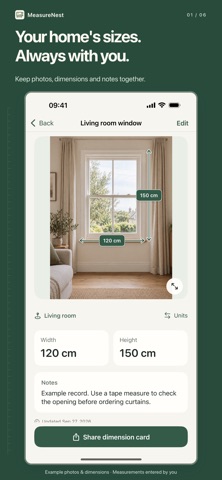
Keep the measurements for every space close at hand. MeasureNest keeps photos, measurements and notes together, so the width of a window, the opening for a new fridge or the space for an office cabinet is always easy to find. A PLACE FOR EACH HOME OR WORKPLACE Create separate spaces for your home, a second home or your office, and switch between them from the home screen. Each space has its own records, room filters, search and Recently Deleted. Move existing records between spaces with their photos, dimensions and notes intact. MAKE A PHOTO YOUR NOTEBOOK Take a photo or choose one from your library. Add dimension lines, enter the numbers you measured and give each dimension a useful name. Move the endpoints, zoom in for a closer look, and undo or redo changes as you work. KEEP THE PART THAT MATTERS Crop the photo to focus on your space. Choose a crop ratio, zoom and move the photo to adjust the frame. Entered measurements stay unchanged, and the app asks before removing lines outside the crop. Undo can restore the photo and lines before you save. Your original photo in Photos stays untouched. FIND THE RIGHT RECORD Organize records by room within each space, and search titles, rooms and notes. Save installation details and clearances alongside your photo. In a saved record, pinch to zoom and drag to inspect details, or double-tap to zoom in and fit the photo to the screen. SHARE A CLEAR PICTURE Export an annotated image or a PDF with measurements and notes. Share it through the iPhone share sheet with the person or app you choose. Combine up to 20 filtered records from the current space into one PDF. KEEP YOUR RECORDS WITH YOU Your library is stored on your device. Export a complete backup of up to 200 MB to Files, then import it to move or restore your records. Backups include all spaces, photos, dimensions, notes and Recently Deleted, including empty spaces. Import merges data without replacing your existing records and supports backups from earlier versions. Deleted records go to Recently Deleted, where you can restore or permanently remove them. SIMPLE FROM THE START • English and Simplified Chinese • Centimeters, millimeters, meters, inches and feet • Light, dark and system appearance • No account, ads or subscription • One paid download includes all features MeasureNest records measurements that you enter yourself. It does not measure distances automatically or infer real-world sizes from a photo. Check the original measurements and required clearances before buying, cutting or installing. Support: mlaohu.app@gmail.com
What's new · 1.1.0
Introducing Spaces: keep measurements for each home or workplace together. • Create separate spaces for your home, a second home or your office. • Switch spaces from the home screen. Records, search, room filters and Recently Deleted follow the selected space. • Move records between spaces with their photos, dimensions and notes intact. • Existing records are kept in My home. Complete backups include every space.
Details