

Readback: METAR & TAF Decoder
Yaniv van der Stigchel · Utilities
Independent analytics for this App Store listing. AppTracker is not affiliated with Yaniv van der Stigchel.
Chart standing · US
What changed · US
Listing changes AppTracker has observed for this app in this storefront — new versions, price moves, rating shifts, and store copy.
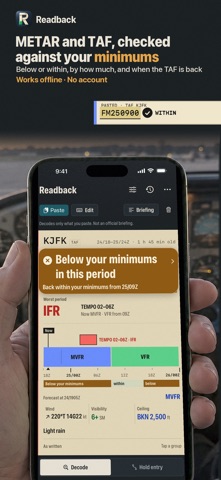
Your minimums first: every METAR and TAF now opens with Below or Within your minimums, and by how much (gust, crosswind, ceiling, visibility). TAF: see when the forecast is back within your minimums. Set your minimums once; starter values are clearly marked. Plain-words briefing for several reports, ready to share or copy. Cleaner decoding, larger tap targets, and more readable example reports.
Screenshots


About
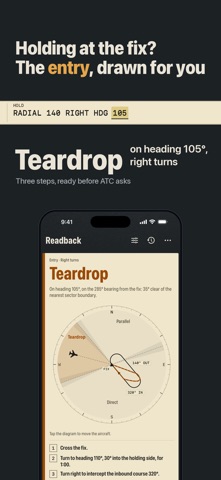
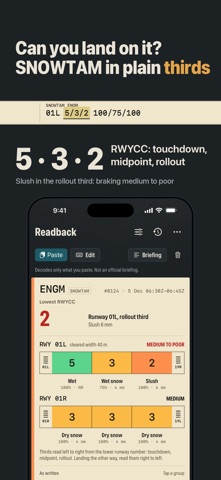
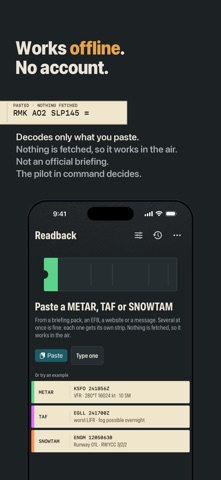
Paste the report. Read it back in plain words. Readback decodes the METAR, SPECI, TAF and SNOWTAM text you already have — from a briefing pack, an EFB, a website or a message. Paste one report or a whole briefing; each becomes its own strip, with the flight category up front and every group explained. TAP A GROUP, SEE WHAT IT MEANS Tap any group in the raw report — BKN025, R24/P1500, TEMPO 2502/2506 — and its meaning appears right under it, while the matching line lights up in the decode. Tap a decoded line and its groups light up in the raw text. A group the decoder does not know is flagged in amber and shown exactly as written. Nothing is quietly dropped. THE FLIGHT CATEGORY, AND WHY VFR, MVFR, IFR or LIFR on every METAR, using the FAA definitions, with the element that set it: "on the ceiling" or "on the visibility". Wind, visibility, ceiling, temperature and dew point, altimeter and humidity as tiles, each coloured by its own category. THE TAF AS A TIMELINE The forecast laid out in time: FM and BECMG on one lane, TEMPO and PROB above it, every period coloured by category, with a now-marker. Drag along it to read the forecast at any hour; the raw group that produced it lights up. The strip's badge shows the worst period, TEMPO included. SNOWTAM, THE GLOBAL REPORTING FORMAT The GRF SNOWTAM drawn as the runway in thirds: the runway condition code of each third on the RCAM colour scale, the contaminant, coverage and depth under it, the braking term for the lowest code, the cleared width, and the situational-awareness section — snowbanks, chemical treatment, taxiway and apron conditions — decoded line by line. HOLDING ENTRY, DRAWN Inbound course or VOR radial, right or left turns, and your heading: the diagram shows the three entry sectors around the fix, the ±5° zones where either entry is acceptable, your aircraft on the ring and the entry flown. Direct, parallel or teardrop, with the headings and turns spelled out, the leg time and the FAA or ICAO holding speed, and the clearance read back in words. Drag the aircraft to try another heading. DENSITY ALTITUDE AND THE RUNWAY IN USE Enter a field elevation and magnetic variation once and every METAR for that station shows density altitude. Enter the runway in use and see the reported wind — converted from true to magnetic — as headwind and crosswind, gust included, drawn on the runway. EVERY GROUP, ANY REGION US and ICAO formats: statute miles and fractions (1 1/2SM, M1/4SM, P6SM), metres, 9999 and CAVOK, RVR with trends, VRB and calm winds, variable direction, knots and metres per second, AUTO, COR and NIL, recent weather and wind shear, runway-state groups, NOSIG/BECMG/TEMPO trends, and the common US remarks: AO2, SLP, the T-group, peak wind, pressure tendency and precipitation. HISTORY, ON THE PHONE Every report you decode is kept in a history on this iPhone, so yesterday's briefing is one tap away. Copy or share any decode as plain text. WHAT IT IS NOT Not for operational use and not an official briefing. Readback fetches nothing: no weather, no reports, no data of any kind. It knows only what you paste, so check the report is current. Brief from an approved source. The pilot in command decides. One payment. No subscription, no account, no ads.
What's new · 1.1
Your minimums first: every METAR and TAF now opens with Below or Within your minimums, and by how much (gust, crosswind, ceiling, visibility). TAF: see when the forecast is back within your minimums. Set your minimums once; starter values are clearly marked. Plain-words briefing for several reports, ready to share or copy. Cleaner decoding, larger tap targets, and more readable example reports.
Details