

Paper Coach: Learn to Draw
Softroni LLC · Education
Independent analytics for this App Store listing. AppTracker is not affiliated with Softroni LLC.
Chart standing · US
What changed · US
Listing changes AppTracker has observed for this app in this storefront — new versions, price moves, rating shifts, and store copy.
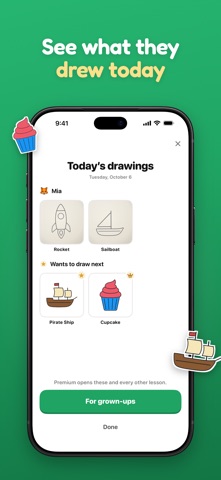
• Before Premium comes up, a short story now shows what's ahead: your drawing in your sketchbook, the lessons coming up, and the drawing your path ends on. • Setting it up for your child, aged 6 to 9? They draw their path's first three lessons before anything is offered. The grown-up's Premium page then shows those three drawings and the lesson on their wish list. • No paper handy? If you skip through your first lesson, Paper Coach offers to remind you tonight, and the lesson waits for you. • "Draw again tomorrow?" is now asked once, when you leave a finished drawing, with a clear yes or no. • After a lesson, the photo screen goes straight to your page. "Draw it again" is in the Sketchbook.
Screenshots




About
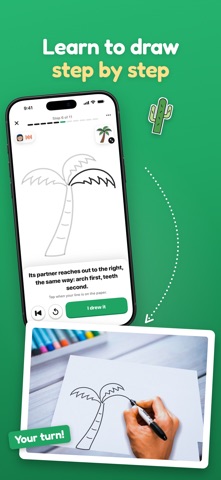
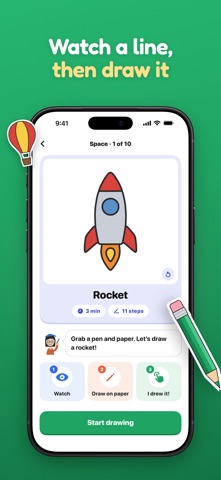
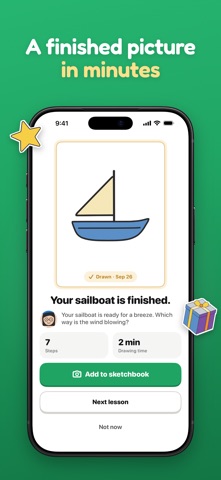
Paper Coach turns your phone into a patient drawing teacher for real pen and paper. Pick a picture. Lina, your coach, draws one line on the screen and then waits. You copy that line onto your page and tap "I drew it". Nothing moves on until you do. Step by step, the picture appears on your paper, in your own hand. WHAT YOU GET • 120 lessons on 12 paths: Plants, Fruits, Sky & Weather, Forms, Wheels, On the Water, In the Air, Space, Landscape, Food & Treats, Around Town, and Fantasy Objects • Three levels, Starter, Core and Advanced, so the first lessons are simple and the later ones build on them • Every step is shown as a moving line, so you can see where it starts, where it goes and where it stops • Lina narrates each step, and you can turn her voice off • Turn the phone sideways for wide pictures • Today's drawing: one Premium lesson, free for everyone, every day • A sketchbook: photograph your finished drawing, even in dim light (Original, Bright or Scan), keep it beside the lesson on your phone only, and fix its light and corners later • Share a finished drawing with friends and family as a card • Profiles for everyone in the family, each with their own progress and sketchbook • A gentle practice reminder, if you want one MADE FOR BEGINNERS No tablet, no stylus, no talent required. Paper Coach is for anyone who says "I can't draw": kids, teens and adults. Lessons take five to ten minutes and end with something you made. FOR FAMILIES Setting it up for your child? Paper Coach can send you a note in the evening with what they drew that day. A child never sees a price: Premium sits behind a grown-ups' check. FREE AND PREMIUM Every path is open, and the first three lessons of each path are free. Paper Coach Premium unlocks every lesson on every path: • Yearly, with a 7-day free trial for new subscribers • Weekly • Lifetime: one payment, no renewal Every plan can be shared with your family through Family Sharing. Payment is charged to your Apple Account when you confirm the purchase, or when the free trial ends. Yearly and Weekly renew automatically unless canceled at least 24 hours before the end of the current period; you can manage or cancel them in your Apple Account settings at any time. Any unused part of a free trial is forfeited when you buy a subscription. Lifetime is a one-time purchase. Privacy Policy: https://softroni.com/privacy-policy Terms of Use: https://www.apple.com/legal/internet-services/itunes/dev/stdeula/ YOUR DRAWINGS STAY YOURS Paper Coach needs no account. Lessons live on your phone, and your photos stay in the app's sketchbook.
What's new · 1.5
• Before Premium comes up, a short story now shows what's ahead: your drawing in your sketchbook, the lessons coming up, and the drawing your path ends on. • Setting it up for your child, aged 6 to 9? They draw their path's first three lessons before anything is offered. The grown-up's Premium page then shows those three drawings and the lesson on their wish list. • No paper handy? If you skip through your first lesson, Paper Coach offers to remind you tonight, and the lesson waits for you. • "Draw again tomorrow?" is now asked once, when you leave a finished drawing, with a clear yes or no. • After a lesson, the photo screen goes straight to your page. "Draw it again" is in the Sketchbook.
Details