

Visitap: Business Card Scanner
Coolblack GmbH · Business
Independent analytics for this App Store listing. AppTracker is not affiliated with Coolblack GmbH.
Chart standing · US
What changed · US
Listing changes AppTracker has observed for this app in this storefront — new versions, price moves, rating shifts, and store copy.
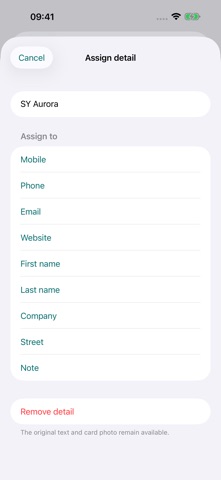
This update improves business card recognition and editing: • More accurate names, phone numbers and email addresses, including personal and shared cards. • Better separation of the scanned card from nearby cards. • Photo and text entry available directly on the home screen. • Tap additional recognized details to assign them to a contact field or notes. • Personal notes included when exporting vCards and transferring to Apple Contacts. Your existing cards are preserved.
Screenshots



About
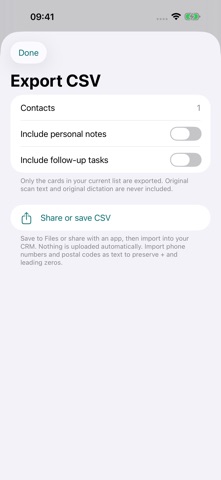
From a new contact to a promise kept. Visitap brings business cards, meeting notes and follow-up tasks together. Scan a card, review the recognized details and save the card in Visitap. Record what you discussed and what needs to happen next. NEW: TAP TO ASSIGN Tap additional recognized details to assign them to contact fields or your notes. Personal notes are also included in vCards and transferred to Apple Contacts. CAPTURE BUSINESS CARDS The camera detects the card outline and takes a photo when recognition is stable. Import photos or paste text too. Review and edit names, companies, phone numbers, email addresses and other details before saving. YOUR OWN CARD LIBRARY Cards are saved separately in Visitap first. Apple Contacts is optional. Scans of paper cards and photo imports keep the card image: tap to view, zoom and swipe between sides. If key details are missing, Visitap immediately suggests checking the reverse side. Additional sides enrich the same card. QR CODES AND DIGITAL CARDS Scan a QR code with a secure HTTPS link to a .vcf or .vcard file and Visitap downloads the file automatically. Embedded portraits can be imported as contact photos; the QR image itself is not kept as a card photo. The linked host can see your IP address. Saved cards are not uploaded, and ordinary website links are not automatically opened or fetched. KEEP THE CONVERSATION Add notes by typing or on-device dictation. On supported devices, Apple Intelligence can assist with field assignment and note editing. Original text remains available for comparison. Add tasks to each contact and check them off when done. MULTI-DAY EVENTS AND YOUR TEMPLATES Choose one day or a date range. New cards receive the active event, shown discreetly in the card list. Each event has its own request templates. Edit, delete or add brochure, quote or callback requests. Confirmed requests create open tasks under Follow-ups. Archived cards keep their event assignment, notes and tasks. OPTIONAL TRADE SHOW MODE Name an event and assign new cards automatically. Mark requests for brochures, quotes or callbacks. View a factual report of contacts, requests and open or completed tasks. Lead groups use matching contact details and do not represent verified identities. EXPORT AND FOLLOW UP Save selected contacts to Apple Contacts. Share individual cards as vCards or export your collection or event as CSV. Choose whether to include notes and tasks. Sharing always starts with your action. CHOOSE YOUR APPEARANCE Set Visitap to System, Light or Dark. ON YOUR DEVICE, WITHOUT AN ACCOUNT Card recognition, notes and available AI features run on your device. Visitap has no tracking SDK and does not upload your cards to our servers. Exports, Apple Contacts, device backups and external links depend on your settings and the services you choose. FREE CORE FEATURES Scanning, contacts, notes, tasks, trade show mode and export are free. A dismissible recommendation for one of our apps may appear after every five processed cards. An optional one-time in-app purchase removes this advertising permanently. No subscription. Requires iOS/iPadOS 18 or later. Local AI features require iOS/iPadOS 26 or later and a supported device with an available Apple Intelligence model. Dictation requires available on-device speech recognition and permissions. Recognition languages depend on the operating system. Review recognized or edited information before accepting it.
What's new · 1.0.2
This update improves business card recognition and editing: • More accurate names, phone numbers and email addresses, including personal and shared cards. • Better separation of the scanned card from nearby cards. • Photo and text entry available directly on the home screen. • Tap additional recognized details to assign them to a contact field or notes. • Personal notes included when exporting vCards and transferring to Apple Contacts. Your existing cards are preserved.
Details