

Gantt Chart: Project Timeline
YOSHIYUKI UEMATSU · Productivity
Independent analytics for this App Store listing. AppTracker is not affiliated with YOSHIYUKI UEMATSU.
Chart standing · US
What changed · US
Listing changes AppTracker has observed for this app in this storefront — new versions, price moves, rating shifts, and store copy.
• Attach images to tasks (Premium, up to 10 per project) • New Images view for the whole project • Better Google Drive sharing: fixed changes not reaching other devices and failures when saving or opening files
Screenshots

About
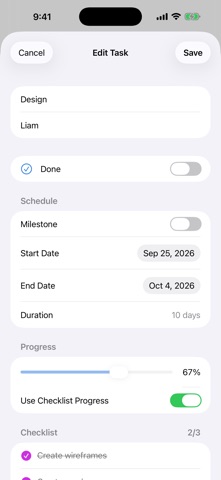
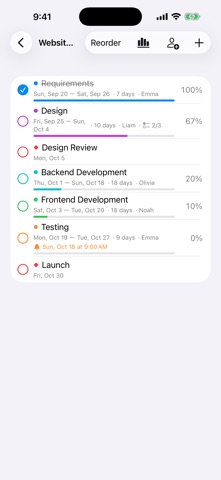
A simple, easy-to-read Gantt chart app for iPhone and iPad. See your project schedule as bars and adjust dates directly with your finger. ■ Send as a File or Link (Premium) • Send a project as a file or a link by AirDrop, Mail or Messages • Open or paste the link and the project is added in the other person’s app (no server needed) • Save to File exports the project as JSON wherever you like ■ Attach Images (Premium) • Attach images to tasks (up to 10 per project) • See every task’s images together in the Images view • In projects shared via Google Drive, images reach the other person too ■ Now on Mac too • The same app runs on your Mac. If you already own Premium, everything is unlocked there as well ■ Clear Gantt chart • Switch between day, week and month views • Today is marked with a red line; weekends are shaded • Task names and dates stay pinned while you scroll in any direction • Milestones (◆) supported ■ Adjust schedules by touch • Touch and hold a bar and drag to move it by days • Drag either end of a bar to lengthen or shorten it • Tap to edit details ■ Progress and checklists (checklists: Premium) • Completion checkmarks and progress for every task • Add a checklist to a task and let its completion drive progress automatically • Overall project progress is calculated for you ■ Reminders (Premium) • Get notified on the start date, the day before, the end date, the day before the end, or at a custom time • Move the schedule and reminders follow along ■ Share with your team (Premium) • Share and sync projects with others using Google Drive • Edits to different tasks made at the same time are both kept • Each person who shares needs Premium ■ Delay tracking & working days (Premium) • Tasks behind schedule turn red, and overdue tasks stand out • Skip weekends and public holidays (about 250 countries and regions) and count durations in working days • Bars snap to working days when you move them ■ Designed for iPad too • Project list and Gantt chart side by side • Dark Mode supported The free version includes 1 project with up to 5 tasks. Premium (one-time in-app purchase) unlocks unlimited projects and tasks, plus checklists, reminders and sharing. No account needed. Your data stays on your device.
What's new · 1.6
• Attach images to tasks (Premium, up to 10 per project) • New Images view for the whole project • Better Google Drive sharing: fixed changes not reaching other devices and failures when saving or opening files
Details