

Mahbanou: Persian Calendar
Zubin Khavarian · Lifestyle
Independent analytics for this App Store listing. AppTracker is not affiliated with Zubin Khavarian.
Chart standing · US
Ratings breakdown · US
The star breakdown behind this app's rating in this storefront.
Screenshots




About
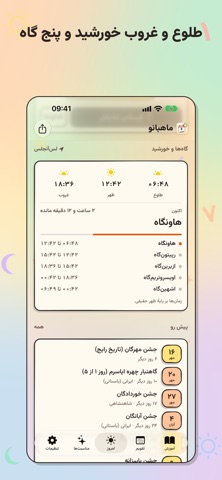
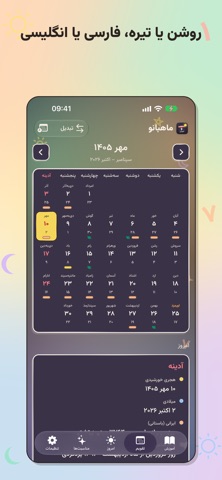
Mahbanou is a Persian calendar for iPhone, iPad and Apple Watch, made for Persian speakers and the Iranian and Zoroastrian diaspora. See the Solar Hijri calendar beside the Gregorian, keep the Zoroastrian calendars at hand, and follow gah times, festivals and Zoroastrian observances, all on your device. CALENDARS • Solar Hijri, also called Jalali or Shamsi, with dates checked against primary astronomical tables • Gregorian side by side • Four Zoroastrian calendars with roj and mah: Shahenshahi, Kadmi, Fasli and Iranian (Bastani) • Date converter between the calendars LEARN • The 30 roj and 12 mah names and what they mean, the gahambars, the Gatha days and the four calendars • Today's roj lesson and the Zoroastrian days coming up DAY AND YEAR • Sunrise, sunset and the five gahs for your city • Festivals such as Nowruz, Mehregan and Yalda, Zoroastrian observances and gahambars, and the Nowruz holidays in red • Nowruz countdown to the moment the new year arrives • Greeting cards to send on festival days STYLES • Sketchbook, or two printed-calendar styles, Chāp and Ātashkadeh, set in Nastaliq and Titr • Light, dark or system appearance WIDGETS AND WATCH • Home Screen and Lock Screen widgets • Apple Watch app and complications for the date and gah at a glance • Optional local reminders for festivals and Zoroastrian observances, the morning's roj and each gah YOUR LANGUAGE • English and Persian, فارسی, with Persian digits PRIVATE AND FREE No accounts, no ads, no analytics, no tracking. The calendar works offline, and your settings and place stay on your devices, including the Watch via the companion app. Completely free, with no in-app purchases.
What's new · 1.4
• Print or save your calendar: one month, a few months or a whole year, a month on each page, in any of the three styles. Print to a printer on your Wi‑Fi, save a PDF to Files, or email it. It's under the month on the Calendar tab. • Reminders your way: nabor reminders the day before (or on the day), a time for each kind of reminder, or everything in one note a day. Two never arrive at once. • What's new: after an update, a short page shows what's new, with a button to try each thing. • On the welcome, swipe between the styles; on iPad the preview shows the iPad layout. • تقویم را چاپ یا ذخیره کنید: یک ماه، چند ماه یا یک سال کامل، هر ماه در یک صفحه، با هر سه سبک. با چاپگرِ روی وایفای چاپ کنید، PDF را در «فایلها» ذخیره کنید یا ایمیل کنید. زیر ماه در زبانهٔ «تقویم» است. • یادآوریها به دلخواه شما: نَبُر از روز پیش (یا همان روز)، ساعتی برای هر یادآوری، یا همه در یک یادداشت روزانه. هیچوقت دو یادآوری با هم نمیرسند. • تازهها: پس از هر بهروزرسانی، صفحهای کوتاه تازهها را نشان میدهد، با دکمهای برای امتحان هرکدام. • در خوشامد، با کشیدن انگشت میان سبکها جابهجا شوید؛ در آیپد، پیشنمایش چیدمان آیپد را نشان میدهد.
Details